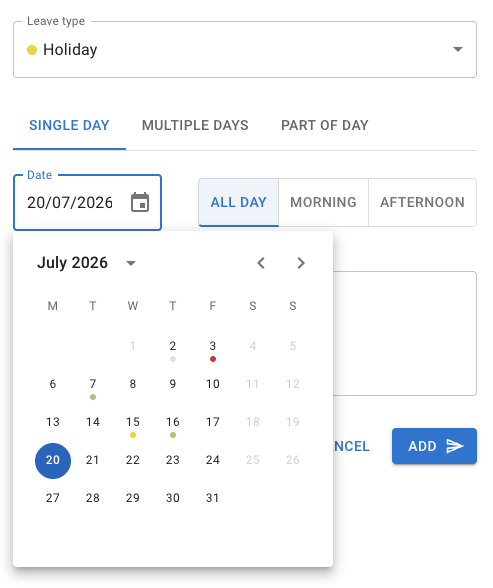
Company and employee schedules can now be set in 15-minute increments instead of 30. This allows for more precise planning—create workdays like 7 hours and 45 minutes, or any other custom duration.
Changelog
Check our latest product updates and news from the TimeOff team.
-
15-Minute Scheduling Increments
enhancement -
Change the start of your business year
new featureNow, you can customize the start of your business year in TimeOff to match your company’s financial or operational calendar. This helps ensure accurate reporting, leave calculations, and compliance with your internal policies. Set your preferred start date to streamline planning and make tracking time off more efficient.
For more details, check out our Knowledge Base article:
How to Change the Start of Your Business Year. -
Hungarian is added to the list of language options
enhancementWe’ve added Hungarian to our extensive language list! 🎉
If TimeOff still doesn’t support your language, let us know - we’re happy to add it to ensure a smooth experience and seamless adoption for your company. 🚀. Drop a line to kate[at]timeoff.management
-
Automatically adding TOIL (Time Off in Lieu) with a coefficient
new featureAutomatically adding TOIL (Time Off in Lieu) with a coefficient is essential for ensuring fairness and precision in managing overtime. In many cases, overtime hours aren’t rewarded on a simple 1:1 basis—some agreements offer 1.5 or even 2 times the time worked, depending on company policies or labor regulations. Without this flexibility, managing TOIL manually becomes error-prone and time-consuming, especially when different coefficients apply across various scenarios. Automating this process not only ensures accurate calculations but also builds trust with employees by fairly compensating their extra effort. It’s a smarter, more precise way to stay compliant and keep your team happy.
-
TimeOff now speaks 8 languages
enhancementBy multiple customer requests, our application is now multilingual.
Tracking absences in employees’ native languages isn’t just a nice-to-have - it’s essential for creating a comfortable and inclusive experience. When people can navigate tools in a language they’re most confident with, it removes barriers, reduces mistakes, and makes it easier for everyone to adopt the application. Even if employees are proficient in English, having the option to use their native language fosters a sense of belonging and makes the system more intuitive. It’s about meeting people where they are, so tracking time off becomes seamless, stress-free, and accessible for all.
Check out latest blog post Managing Leave for Geographically Dispersed Teams.
-
Blackout days and events
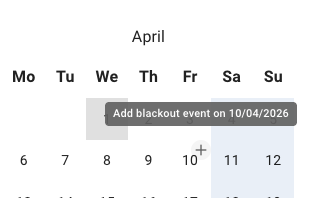
new featureCompany events and blackout periods, providing visibility and transparency for employees and management alike.
At TimeOff, we’ve designed a dedicated section for managing company events and blackout periods, providing visibility and transparency for employees and management alike. Well-communicated blackout days announced in advance give employees sufficient time to plan their leaves without disrupting business operations during busy periods.
The process of setting up blackout days is straightforward. Simply add a blackout day with a description to the calendar, and employees will see it reflected on their personal calendars. On those days, employees will be restricted from booking leave, ensuring smooth operations during critical times.
Company events are meant to keep employees informed about important dates on the company calendar. These can include team-building activities, essential meetings, presentations, and all-hands talks. While these days are not blocked for time-off bookings, they enhance communication and provide convenience by eliminating the need for emails and extra tools, ensuring all employees stay on the same page.
-
Carry over page
new featureAt TimeOff.Management, we’ve designed the Carry Over feature to manage unused PTO/allowance at year-end.
It’s that time of year again, bringing not only festive cheer but also the need to prepare your company records for the new year. One essential task on your mind might be how to carry over unused balances into 2024.
At TimeOff.Management, we’ve designed the Carry Over feature to manage unused PTO/allowance at year-end.
Here’s a quick overview:
Company-Wide Carry Over Policies: Easily set up rules for carrying over unused days, like transferring up to three days into the next year.
Employee-Level Adjustments: Handle carry overs on a case-by-case basis by overriding global policies for specific employees directly in the Carry Over section.
Real-Time Visibility: Once carry over is completed, you’ll see:Updates on the Carry Over page, detailing days transferred and remaining balances. Adjustments logged in the current year for transparency. A clear “Carried Over” line in the next year’s allowance breakdown.
For more details, check out our End-of-Year Guide.
-
Half-day public holidays
enhancementFor convenience, the ability to create half-day bank holidays has been added.
This feature was born out of multiple feedback from our customers, especially during the Christmas and Easter seasons. After engaging with our users, it became clear that many businesses designate half-days just before or after public holidays to provide additional time off for employees.
These half-days are either recorded as public holidays or deducted from allowance balances or special earned days. To address this need, we developed the Half-Day Bank Holiday feature.
This enhancement ensures that the experience with TimeOff is smooth and seamless, catering to businesses that want to streamline their leave management process during busy seasons.
-
New Auto-Approval Options Added
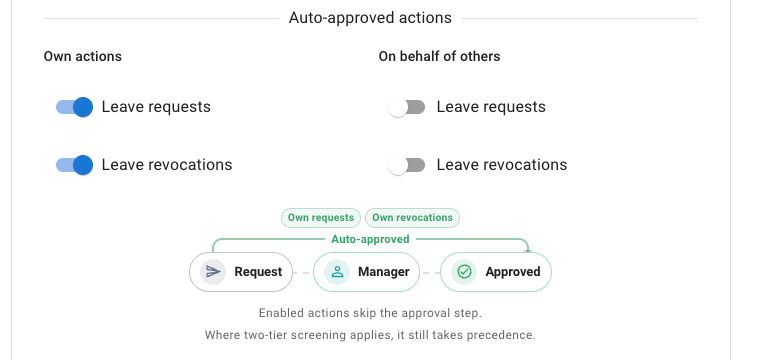
new featureIn the Auto-Approval section, we’ve introduced the ability to automatically approve all leave requests booked by Admins on behalf of other employees.Additionally, there’s now a toggle to disable email notifications for such bookings, ensuring a smoother process.
-
New mobile screens
new featureManage leave requests effortlessly on our mobile-friendly platform.
Log in with your email, password, or Google, or Microsoft credentials.
Book, cancel, or approve leave requests—all from your phone. Simple, flexible, and always accessible.