
Custom leave policies
Custom leave policies.
Set up leave types that work differently by department, location, tag or individual employee — with access rules, booking increments, selected allowance exceptions, limit overrides, private labels, email watchers and reminders for the leave that needs follow-up.
30-day free trial · No credit card required · UK-hosted · UK support
- Leave access
- Booking increments
- Tags
- Reminders
Policy options
Make each leave type fit the people who use it.
Different teams often need different leave rules. TimeOff keeps those rules clear without showing employees options that do not apply to them.
Leave access
Make selected leave types available to the right departments, locations, tags or employees.
Tags
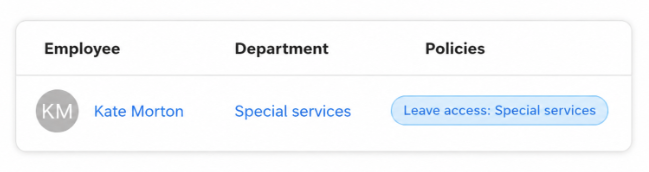
Group the people your org chart cannot — contractors, first-aiders, remote staff — then scope a Leave Access policy to that group.
Booking increments
Use 15-minute, 30-minute, hourly, half-day or full-day booking depending on the policy.
Policy exceptions
Let selected employees go below their allowance, or above a leave type limit, when it has been agreed.
Private leave labels
Hide or obfuscate sensitive leave types so the right people see details without exposing more than needed.
Reminders
Email managers and teammates before approved leave starts, as one digest a night rather than a message per booking.
Leave access
Show the right leave types to the right people.
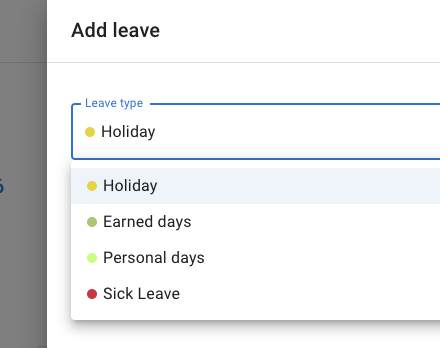
Leave access avoids clutter and confusion. A leave type can be available only to the employees, departments, locations or tags that actually need it.
- Department and location rules for leave types used by only certain teams.
- Policies by employee for special arrangements and management-only leave options.
- New joiners are covered automatically when they are added to a department or location the policy applies to.
- Cleaner booking forms, because people only see the leave options that apply to them.
Tags
Group the people your org chart cannot.
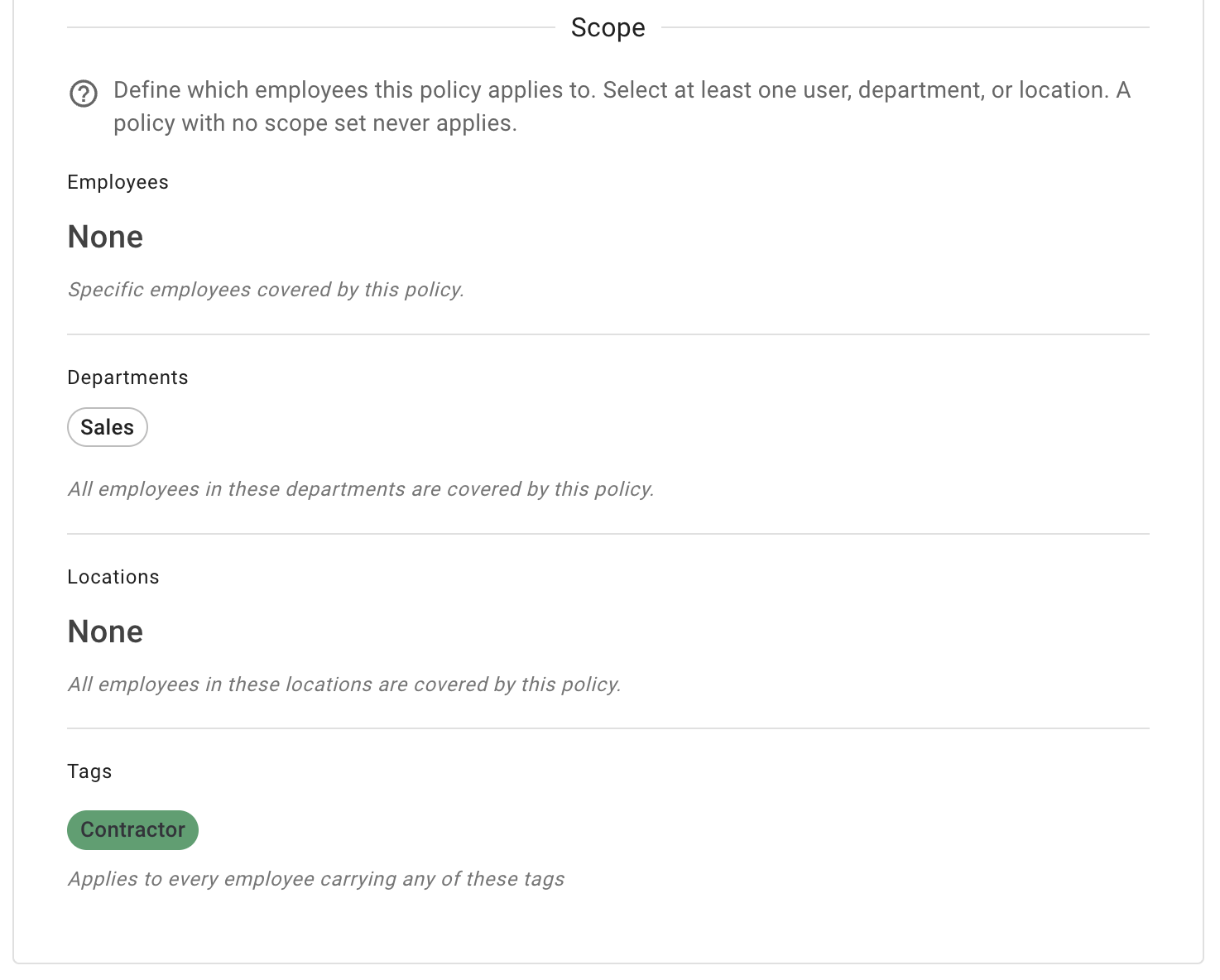
Some groups cut across departments and locations — contractors, first-aiders, remote staff, night shift. An administrator defines a tag once, applies it to whoever belongs, then points a policy at the tag instead of naming people one by one.
- A tag is a name and a colour an administrator defines, and one employee can carry several at once.
- Scope a Leave Access policy to a tag, so the leave types follow the group rather than the reporting line.
- The same scope on Restrict leave overlap, reminder and leave increment policies, so one grouping can drive more than one rule.
- Tag visibility governs the chip, not the policy — someone can be covered by a policy scoped to a tag they cannot see.
Booking increments
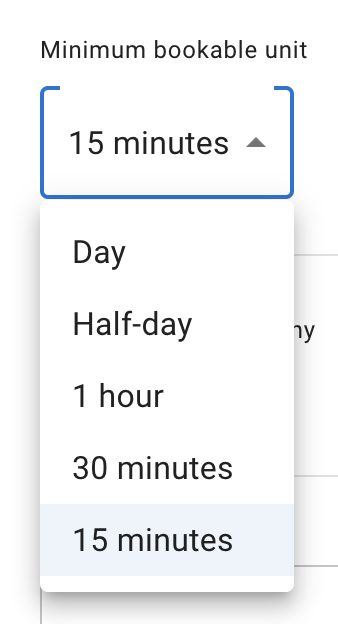
Set the smallest booking unit by policy.
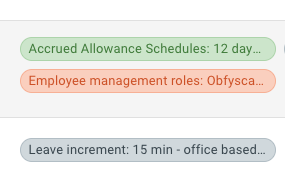
One team only needs full days. Another needs shorter bookings — warehouse staff in 30-minute blocks, office staff in 15-minute increments. A leave increment policy sets the smallest unit for whoever it covers.
- Minimum bookable unit of 15 minutes, 30 minutes, one hour, half a day or a full day.
- Assign by employee, department, location, tag or the whole company — a policy covers whoever you point it at, minus anyone you exclude.
- Narrow a policy to selected leave types, so holiday can be taken in days and other leave types in hours. A rule that names a leave type overrides one that names none.
- Accurate for hourly teams, where a two-hour absence should not cost half a day.
Policy exceptions and privacy
Allow exceptions without changing the rule for everyone.
Sometimes one employee needs to go below their allowance, or above a leave type limit for a special case. TimeOff keeps those exceptions controlled instead of changing the whole policy.
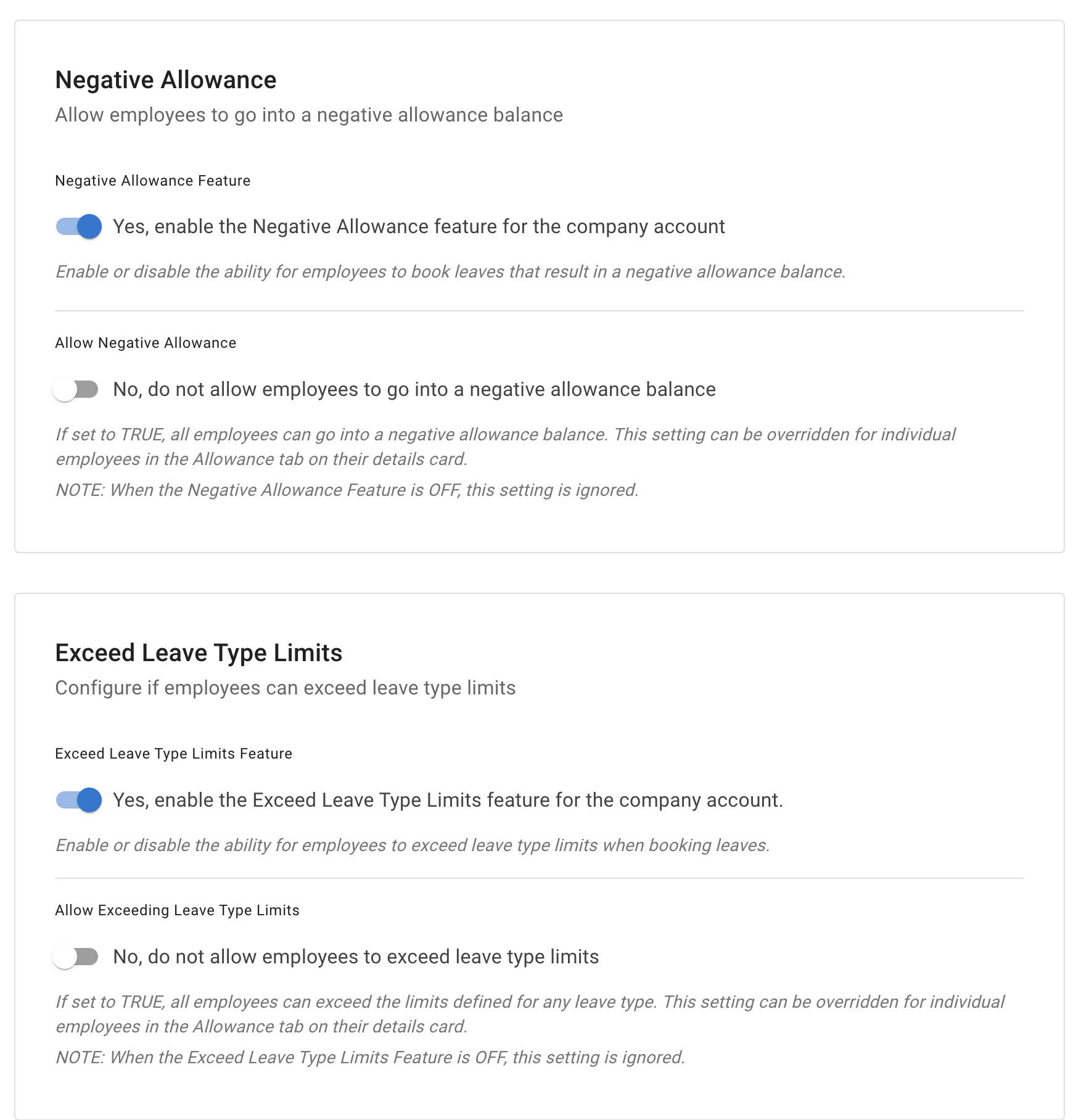
- Negative allowance for selected employees, so an agreed exception can take one balance below zero.
- Exceed leave type limits is a separate permission, because a leave type limit is not the same thing as the main allowance.
- Individual limit overrides when one person simply needs a different cap rather than a one-off exception.
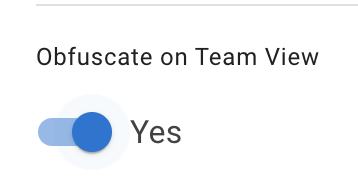
- Hidden or obfuscated labels, so sensitive leave shows as a generic *Leave* on Team View — or not at all — while admins and supervisors keep the detail.
Email watchers
Keep HR in the loop.
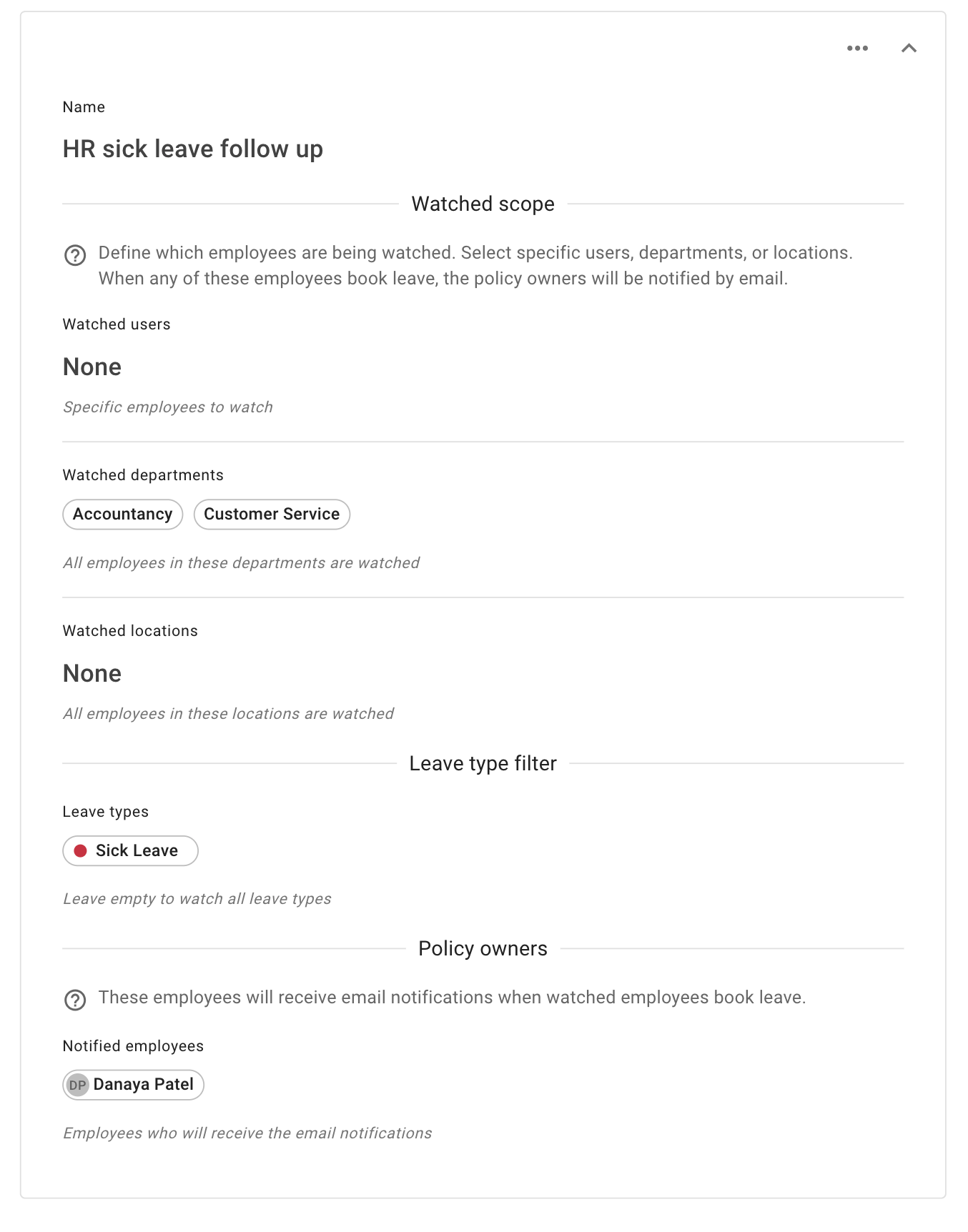
Some leave types need follow-up. Sick leave might need paperwork, a return-to-work note or a manager check-in. A Watch by Email policy copies the right people in, without anyone having to forward the request.
- Watch selected leave types such as sick leave, unpaid leave or working from home — or leave the filter empty to watch them all.
- Choose who is watched: named employees, whole departments or whole locations.
- Notify people who are not the manager — HR, a project lead or a senior manager who needs visibility without supervising the team.
- Fewer missed follow-ups on the requests that need an extra step.
Reminders
Remind the right people before approved leave starts.
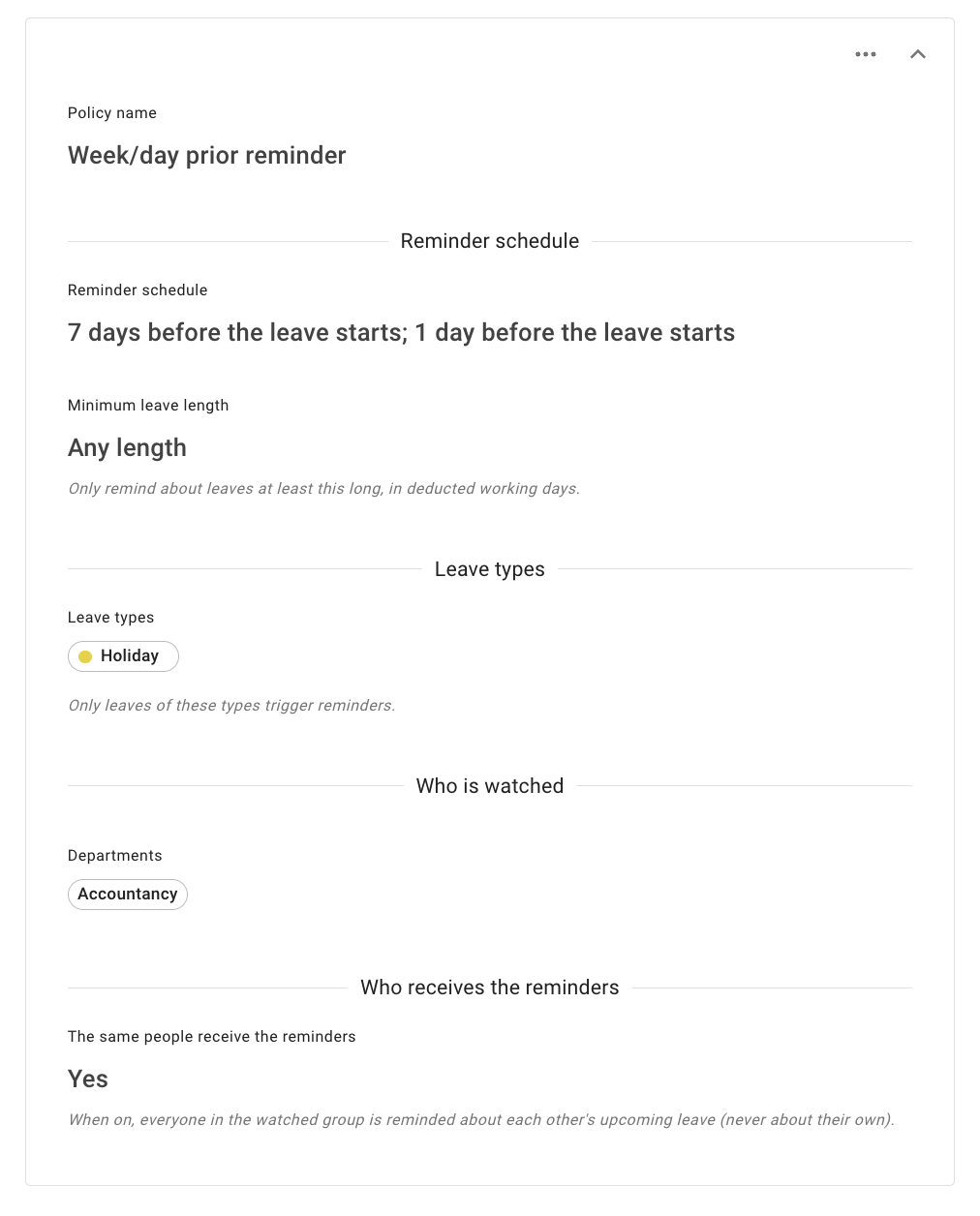
A reminder policy watches one group of employees and emails another before those employees' approved leave starts. Managers and teammates find out what is coming without going to look for it.
- Choose who is watched and who is told — the same group of people, or two different ones.
- One digest a night, not a message for every booking, so a policy can watch a whole department without flooding anyone's inbox.
- One reminder or two ahead of the leave, with optional filters for leave type and for how long the leave is.
- Only approved leave triggers a reminder, and nobody is ever reminded about their own.
Custom policies without a messy setup.
Start with simple leave types, then add access rules, tags, increments, selected exceptions, private labels, watchers and reminders where your team needs more control. All of it is included on every account, at one published price per person, per month. None of it sits behind a tier.
Leave access and tags
Point a Leave Access policy at selected employees, departments, locations or a tag.
Booking units
Set the smallest unit people can book, from 15 minutes to a full day.
Exceptions and privacy
Allow agreed exceptions to allowance or a leave type limit, and hide sensitive labels.
Watchers and reminders
Copy HR in on leave that needs follow-up, and tell the team before leave starts.
Common questions
Policy questions we are asked most.
- Can different departments have different leave types?
- Yes. A Leave Access policy groups selected leave types together and assigns them to employees, departments, locations or tags. The leave types page stays your main storage area: create a leave type once, then add it only to the policies that need it. When someone new joins a department or location the policy covers, they are picked up automatically, so nobody has to remember to grant access.
- Can a policy follow a group that is not a department?
- Yes, with tags. A tag is a name and a colour an administrator defines in General settings and applies to whoever belongs — contractors, first-aiders, remote staff, night shift — and one employee can carry several at once. A Leave Access policy's scope then takes tags alongside employees, departments and locations, so the leave types follow the group rather than the reporting line. Restrict leave overlap groups, reminder policies and leave increment policies are scoped the same way. One thing worth knowing: who can see a tag controls where the tag itself is shown, not who a policy covers, so someone can be included by a policy scoped to a tag they cannot see.
- What is the smallest amount of leave someone can book?
- The minimum bookable unit can be 15 minutes, 30 minutes, one hour, half a day or a full day. It is set by a leave increment policy covering the employees, departments, locations or tags you choose, or the whole company, minus anyone you exclude. A policy can also be narrowed to selected leave types, so holiday can be taken in days and other leave types in hours. A rule that names a leave type overrides one that names none.
- Can one employee go over their allowance without changing the policy for everyone?
- Yes, with negative allowance. Turn the feature on in Advanced Settings, then either allow it company-wide or — far more common — enable it for one person on Employee Details → Allowance. That employee can book past their remaining balance, and their balance may then show as negative. Everyone else is unaffected, and requests still go through the normal approval route.
- What is the difference between negative allowance and exceeding a leave type limit?
- They affect different things. Negative allowance is about the main allowance balance — the employee's holiday, annual leave or PTO. A leave type limit is a separate yearly cap on one leave type, such as ten days of sick leave. Going above that cap needs the Exceed leave type limits permission, which is a different setting. If a person needs both, enable both. If they simply need a different cap, set an individual limit for that leave type instead.
- Can we hide sensitive leave types from colleagues?
- Yes, and you can do it per leave type rather than all at once. Each leave type has two privacy settings that trade off differently. Obfuscate it, and colleagues who can see the team calendar get a generic Leave instead of the name — they can still plan cover around the absence without knowing the reason. Hide it, and the leave does not appear to them at all: stronger privacy, but that date drops out of their view of the team. There is also a company-wide setting that applies to every leave type together. On Team View admins and supervisors continue to see the full detail their permissions allow. Leave synced out to Google Calendar or Outlook is a separate decision again: you choose whether the feed names the leave type or shows a neutral Busy entry.
- Can HR be copied in on certain leave requests?
- Yes, with a Watch by Email policy. You set the watched scope — named employees, whole departments or whole locations — and optionally filter it to specific leave types, such as sick leave only. The employees named as policy owners then receive an email whenever a watched person books that leave. It is designed for HR, project leads and senior managers who need visibility without being anyone's supervisor.
- Can TimeOff remind people before someone is away?
- Yes, with a reminder policy. It watches one group of employees and emails another before those employees' approved leave starts — the same group of people, or two different ones. Recipients get at most one digest a night rather than a message per booking, so a policy can watch a whole department without anybody's inbox suffering for it. You can send one reminder or two, filter by leave type or by how long the leave is, and scope both groups by employees, departments, locations or tags, with exclusions. Only approved leave triggers a reminder, and nobody is reminded about their own.
Useful features without unnecessary complexity.
Leave policies should give admins control without making the system harder for employees.
“TimeOff.management is a feature rich, affordable leave management solution backed by an excellent support team that’s quick to respond and genuinely helpful. The pricing is refreshingly clear and low‑cost, with no unnecessary complexity, making it great value for teams that just want leave management to work without hassle.”
Create leave policies that match your team.
Set access rules, tags, increments, selected exceptions, private labels, watchers and reminders so each leave type works the way your business needs it to work.
30-day free trial · No credit card required · Cancel anytime