
Why isn’t leave being deducted from the allowance?
If a leave request is not reducing an employee’s allowance, the most common reason is the leave type setting.
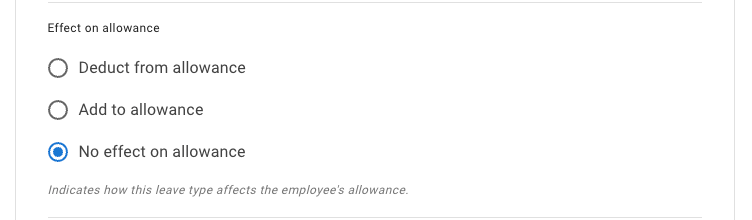
In TimeOff.Management, each leave type decides how a request affects allowance.
A leave type can:
- Deduct from allowance — the leave reduces the employee’s available allowance
- No effect on allowance — the leave is recorded, but does not change allowance
- Add to allowance — the leave increases allowance, such as overtime or TOIL
For leave to reduce the employee’s holiday, annual leave, vacation, or PTO balance, the leave type must be set to Deduct from allowance.
How to check the leave type setting
To check or update the setting:
- Go to Settings → Leave types.
- Select the leave type you want to check.
- Open the leave type settings.
- Find Effect on allowance.
- Select Deduct from allowance.
- Save the changes.
Read more: Leave types
Common examples
This often happens when a leave type is used for tracking, but not for reducing the main allowance.
For example:
| Leave type | Common allowance effect |
|---|---|
| Holiday or annual leave | Deduct from allowance |
| Vacation or PTO | Deduct from allowance |
| Sick leave | No effect on allowance, or its own limit |
| Working from home | No effect on allowance |
| Unpaid leave | No effect on allowance, depending on company policy |
| Overtime or TOIL earned | Add to allowance |
If a holiday or PTO leave type is set to No effect on allowance, requests will appear on the calendar but will not reduce the employee’s balance.
Check whether the employee uses Unlimited Allowance
If the employee is assigned to an Unlimited Allowance policy, they may not see a standard remaining balance.
Unlimited Allowance removes the shared yearly allowance balance and hides the normal allowance widget.
Employees can still book leave, and leave type limits can still apply.
Read more: Unlimited Allowance
Check the employee’s allowance setup
If the leave type is correct, check how the employee’s allowance is set up.
Allowance may come from:
- department allowance
- individual allowance
- an accrual schedule
- carry over
- manual adjustments
- tenure-based allowance
For a full overview, read: Setting up allowances
Check the employee schedule
Employee schedules help TimeOff.Management calculate how much leave should be deducted.
This is especially important for part-time employees or employees with non-standard working patterns.
For example, if an employee does not work on Fridays, a Friday booking may not deduct allowance in the same way as a normal working day.
Read more: Setting employee schedule
Check partial-day or hourly settings
If your company allows half-day, part-day, or hourly leave, the deduction may look smaller than expected.
For example, a morning booking may deduct half a day instead of a full day.
Read more: Allow partial leave
Check whether the request is pending
Depending on company settings, some balances may show differently while a request is still pending.
Check whether the leave request is:
- pending
- approved
- declined
- cancelled
- revoked
If the request has not been approved yet, ask the manager or admin to review it.
Leave type limits are different from allowance
Some leave types have their own yearly limits.
This is separate from the employee’s main allowance balance.
For example, sick leave may have a yearly limit but may not deduct from holiday allowance.
If you need to control how much of one leave type an employee can use, read: Individual limits for leave types
Best practice
When a balance does not look right, check the leave type first.
Most allowance deduction issues are caused by a leave type being set to No effect on allowance or Add to allowance instead of Deduct from allowance.