
Unlimited Allowance
Unlimited Allowance is a flexible way to manage leave when your company does not want to track one shared yearly allowance balance.
Some companies call this:
- unlimited PTO
- unlimited holiday
- flexible leave
- flexible time off
- trust-based leave
Instead of giving employees one fixed number of days for the year, employees can request leave when needed.
Managers still review and approve requests, so the business stays in control.
How Unlimited Allowance fits with allowance setup
Most allowance setups use a yearly balance.
For example, an employee may have 25 days of holiday allowance or PTO per year.
Unlimited Allowance works differently.
It removes the shared yearly balance and lets leave be tracked through leave types, approvals, and leave type limits.
Use Unlimited Allowance when you do not want employees to see one fixed remaining balance.
For a full overview of all allowance options, read: Setting up allowances
When to use Unlimited Allowance
Unlimited Allowance is useful when:
- your company offers unlimited PTO
- employees do not have one fixed yearly allowance
- leave is approved based on business needs
- you want a simpler employee view
- you want to track leave without showing a remaining balance
- different leave types need their own rules or limits
This works well for teams that want a flexible leave policy, but still need clear records and approval control.
How to set up Unlimited Allowance
Go to:
Settings → Employee policies → Unlimited Allowance
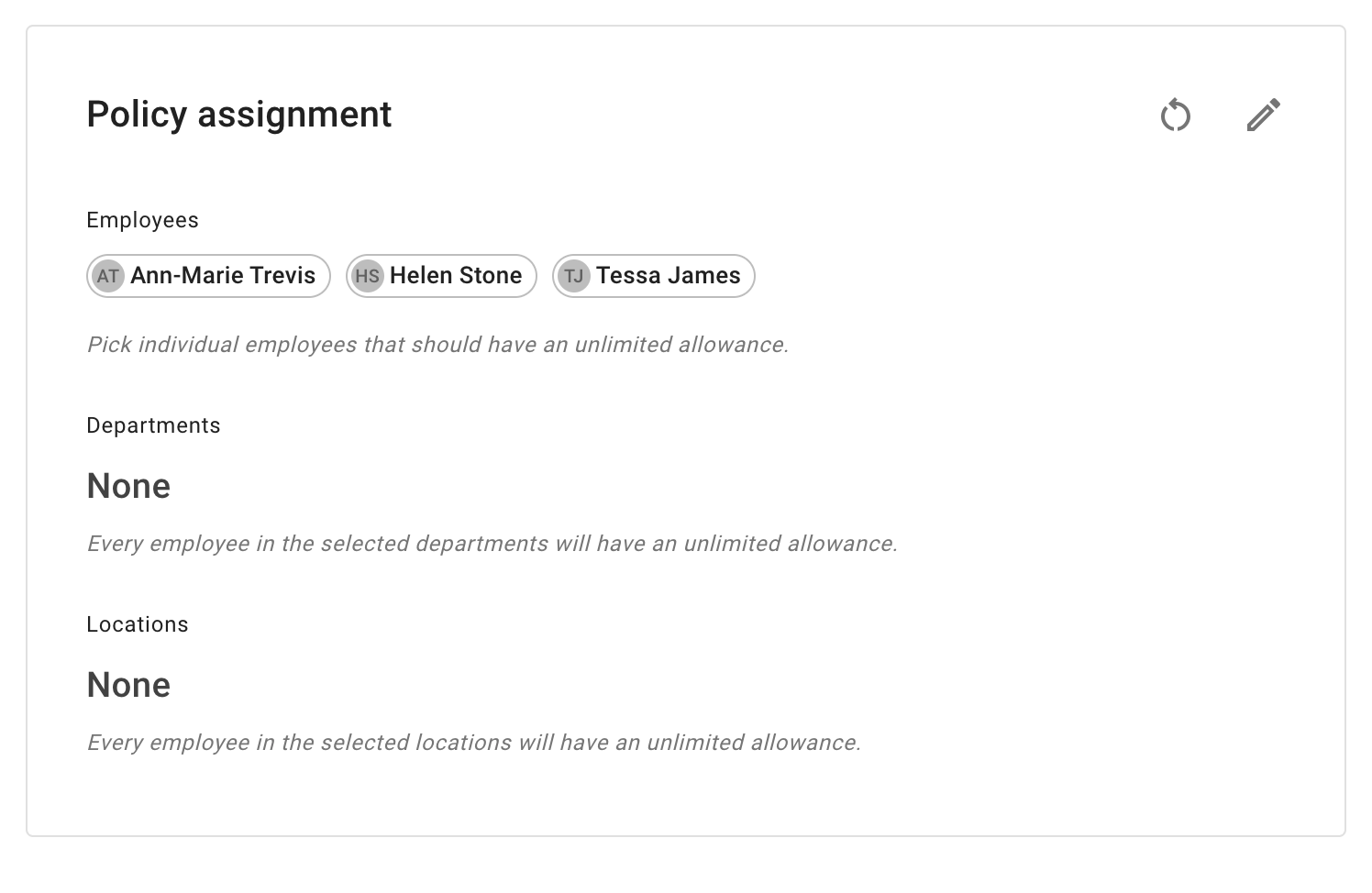
From there, you can assign Unlimited Allowance to:
- selected employees
- departments
- locations
This means you do not have to apply Unlimited Allowance to the whole company.
For example:
- one department may use unlimited PTO
- one location may use a flexible leave policy
- senior employees may have unlimited allowance
- contractors may follow a different setup from employees
What changes when Unlimited Allowance is enabled
When Unlimited Allowance is enabled:
- the allowance widget is hidden
- the remaining balance is not shown
- employees can still request leave
- managers can still approve or decline requests
- leave types are still shown
- days used are still tracked
- leave type limits can still apply
This keeps the employee view simple.
It also helps avoid confusion when there is no fixed yearly balance to show.
What employees see
Employees will not see a standard remaining allowance balance.
In My Calendar, they can still see their own leave information, such as:
- leave requests
- approved leave
- pending leave
- leave types
- days used
- leave type limits, if any
- company events
- blackout dates
Read more: My Calendar
What managers and admins can still control
Unlimited Allowance does not remove control.
Admins and managers can still use:
- leave types
- approval rules
- leave type limits
- overlap rules
- visibility settings
- blackouts
- company events
- reports
This means your company can offer flexible leave without losing oversight.
Use leave type limits with Unlimited Allowance
Leave type limits are useful with Unlimited Allowance.
They let you control how often a specific leave type can be used, even when there is no shared yearly allowance balance.
For example, you may still want limits for:
- sick leave
- working from home
- study leave
- unpaid leave
- compassionate leave
- special paid leave
This gives you flexibility and structure at the same time.
Read more: Leave types
Employee-specific leave type limits
Sometimes one employee needs a different limit for one leave type.
For example:
- one employee may have more working from home days
- one employee may have a custom sick leave limit
- one employee may have a temporary special agreement
You can manage this with individual limits for leave types.
Read more: Individual limits for leave types
Unlimited Allowance or standard allowance?
Use this table to choose the right setup.
| Setup | Best for |
|---|---|
| Department allowance | Most employees have the same fixed yearly allowance |
| Individual allowance | One employee needs a different fixed yearly allowance |
| Accrual schedule | Employees earn leave gradually over time |
| Unlimited Allowance | Employees do not have one fixed yearly balance |
| Leave type limits | You want to limit a specific leave type |
If your company still needs a fixed annual allowance, use department allowance or individual allowance instead.
If employees earn leave over time, use an accrual schedule.
Read more: Setting up allowances
When not to use Unlimited Allowance
Unlimited Allowance may not be the best option if:
- employees must have a fixed yearly entitlement
- your company needs to show remaining balance
- leave must be accrued month by month
- payroll or HR records need a clear annual allowance figure
- your business has strict statutory or contract allowance rules
In these cases, use a standard allowance setup instead.
Reports and year-end review
Even with Unlimited Allowance, you can still use reports to review leave usage.
Reports can help you check:
- who has taken leave
- which leave types are used most often
- leave trends by department or location
- absence records for a selected period
Read more: Reports
If you use Unlimited Allowance, year-end carry over may not work the same way as a fixed allowance setup because there is no single remaining balance to carry forward.
Best practice
Use Unlimited Allowance when your company wants a flexible leave policy without showing a fixed remaining balance.
Keep your leave types clear.
Use leave type limits where needed.
Make sure managers understand how to approve requests fairly and consistently.