
Setting up allowances
Allowance is the amount of leave an employee can use during the company year.
Some companies call this:
- holiday allowance
- annual leave allowance
- vacation allowance
- PTO allowance
- paid time off
In TimeOff.Management, you can keep allowance simple or build a more detailed setup.
Most companies start with a department allowance. Then they add individual overrides, accrual schedules, or leave type limits when needed.
This guide explains the main allowance options and links to the detailed articles for each setup.
Main ways to set allowance
| Option | What it does | Best for |
|---|---|---|
| Department allowance | Gives everyone in a department the same allowance | Simple company setup |
| Individual allowance | Gives one employee a custom allowance | Part-time staff, custom contracts, special cases |
| Accrual schedule | Releases allowance gradually over time | Companies where leave is earned monthly or over another schedule |
| Tenure-based allowance | Adds allowance based on length of service | Companies that reward long service |
| Unlimited allowance | Removes the single yearly allowance balance | Unlimited PTO or flexible leave policies |
| Manual adjustment | Adds or removes allowance for one employee | Corrections, TOIL, one-off changes |
| Leave type limits | Sets limits for a specific leave type | Sick leave, working from home, unpaid leave, study leave |
How allowance works
TimeOff.Management checks allowance in this order:
-
Employee setup If an employee has an individual allowance or accrual schedule, this replaces the department allowance.
-
Department setup If there is no employee override, the employee follows the allowance set for their department.
-
Leave type setup The leave type decides whether a booking deducts from allowance, adds to allowance, or has no effect.
-
Schedule and working pattern The employee schedule helps calculate how much allowance is deducted for each booking.
This means allowance is not controlled by one setting only.
It can depend on the department, employee settings, leave types, schedules, and company policies.
By default, employees who join or leave during the leave year have that year’s allowance pro-rated.
Employees whose allowance comes from an accrued allowance schedule follow the schedule.
Read more: Allowance for employees who join or leave during the year
Before you set up allowance
Before changing allowance, check these settings first.
Company year
Your company year controls when annual allowance starts and resets.
If your leave year does not start in January, update the year start month in General Settings.
Read more: How to change the start of your business year
Employee schedules
Schedules help TimeOff.Management calculate how much leave should be deducted.
For example, if an employee works four days a week and books a full week off, the system should deduct four working days, not five.
Read more: Setting employee schedule
For shift workers or repeating work patterns, use rotas.
Read more: Setting employee rotas
Partial leave
If employees can book mornings, afternoons, or hours, check your partial leave settings.
Read more: Allow partial leave
Leave types
Leave types control how each booking affects allowance.
A leave type can:
- deduct from allowance
- add to allowance
- have no effect on allowance
- have its own yearly limit
Read more: Leave types
1. Set allowance from department
Department allowance is the easiest way to manage PTO or holiday allowance.
Each department has its own allowance. All employees in that department follow the same allowance rule.
This is best when most employees in a team have the same entitlement.
For example:
- full-time employees get 25 days
- part-time employees are placed in a separate department with a different allowance
- contractors are placed in a department with no paid holiday allowance
To assign allowance for a department:
- Go to Settings → Departments.
- Select the department.
- Enter Edit Mode.
- Add or update the allowance.
- Save the changes.
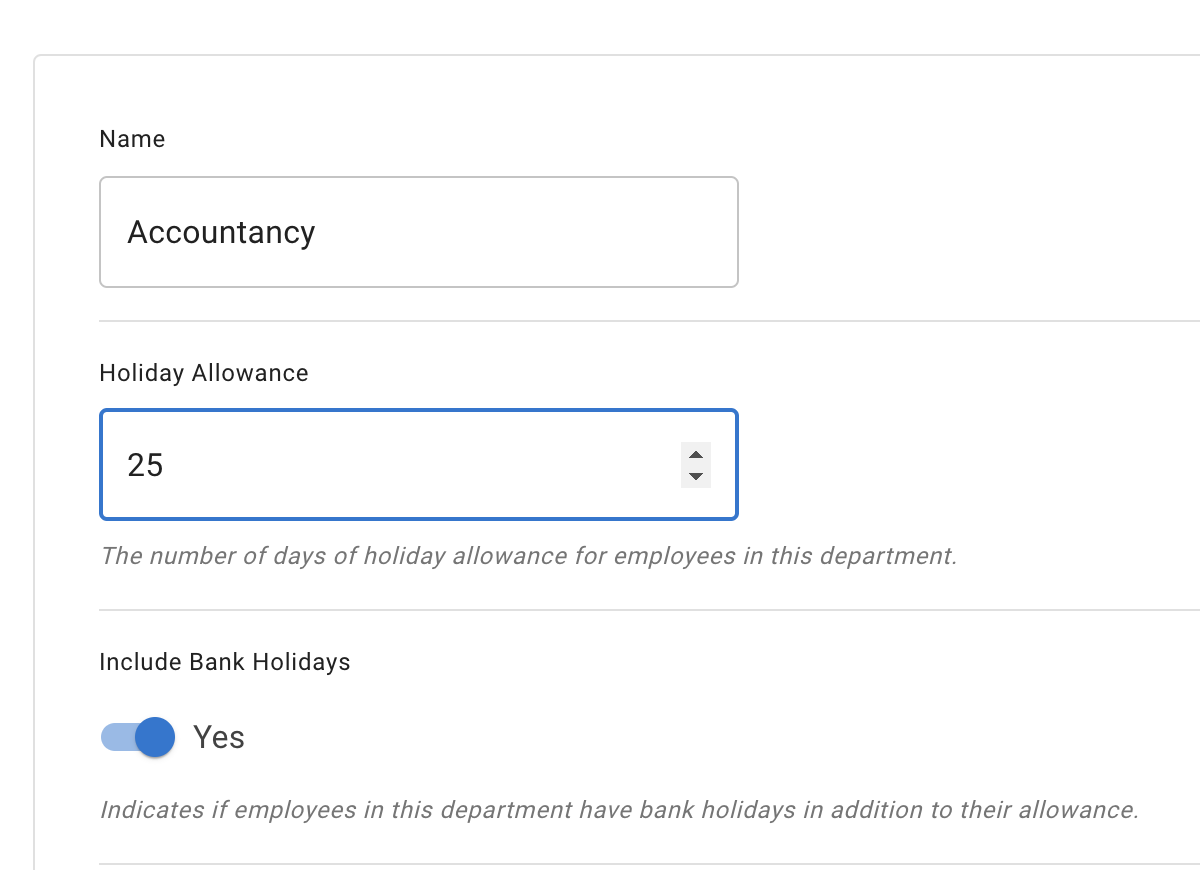
This gives everyone in that department the same standard allowance.
Read more: Managing departments
2. Override department allowance for one employee
Use an employee override when one person needs a different allowance from their department.
This replaces the department allowance for that employee.
You can use this for:
- part-time employees
- custom contracts
- new starters
- employees with special agreements
- employees who should use an accrual schedule
Go to:
Employees → Select employee → Employee Details → Allowance tab
Then enter Edit Mode.
From here, you can set an individual allowance or add an accrual schedule.
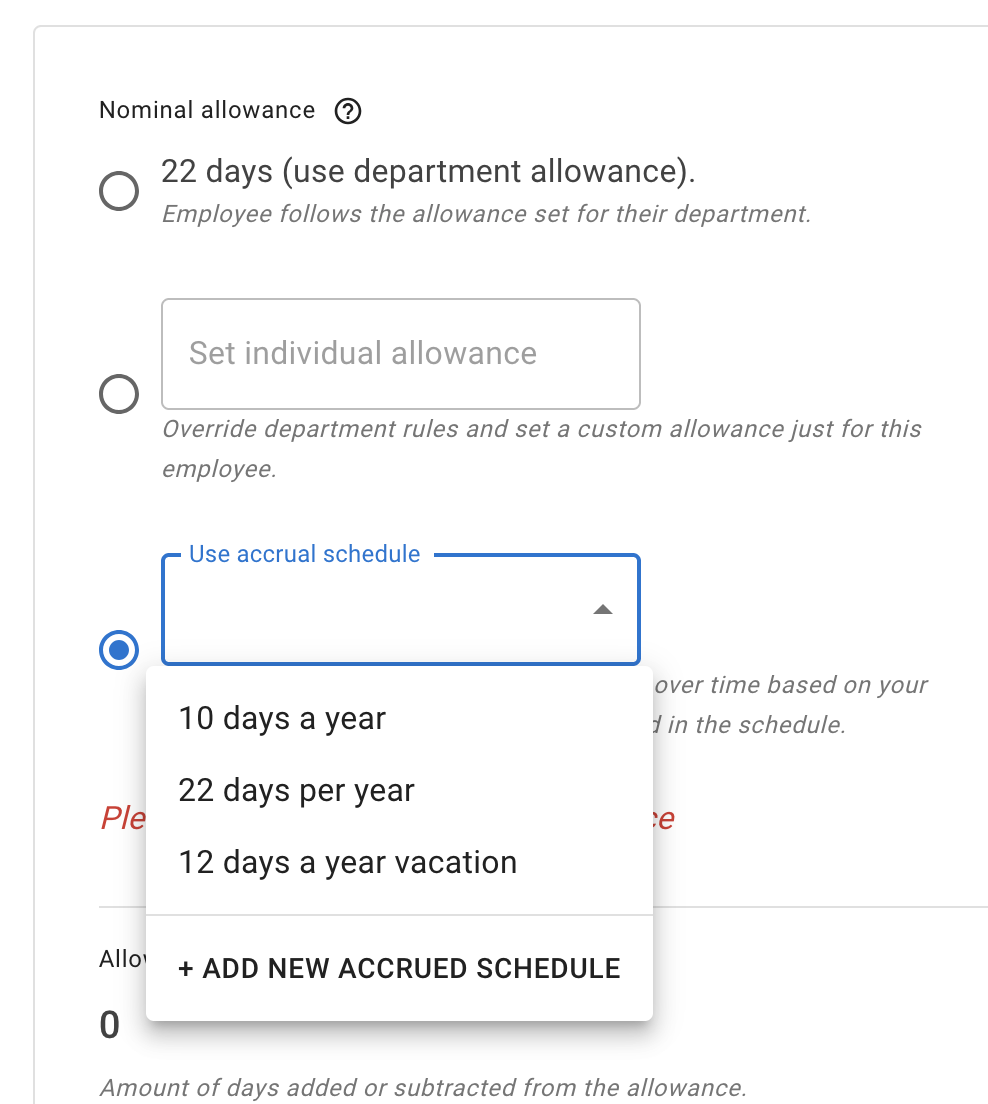
3. Use individual allowance for a fixed yearly amount
Individual allowance is front-loaded.
This means the employee gets a fixed number of days from the start of their allowance year.
Use this when the employee should have a simple custom amount.
For example:
- the department allowance is 25 days
- one employee should receive 20 days
- another employee should receive 28 days
Individual allowance is simple and quick to manage.
Read more: Setting up individual allowances
4. Use an accrual schedule when leave is earned over time
Use an accrual schedule when employees earn leave during the year.
Instead of giving all days at the start of the year, allowance is added gradually.
This is useful when employees earn leave:
- monthly
- quarterly
- after each work period
- across a fixed contract period
- during part of the company year
Accrual schedules are managed in Employee policies.
Go to:
Settings → Employee policies → Accrued Allowance Schedule
You can add the employee to an existing policy or create a new one.
Read more: Employee policies - Accrued Allowance Schedule
5. Add allowance based on length of service
Some companies give employees more leave after they have worked for the company for a certain time.
For example:
- 25 days from start date
- 26 days after 2 years
- 27 days after 5 years
- 30 days after 10 years
This can be managed with Tenure Based Allowance.
TimeOff.Management can move employees into the correct allowance band when they reach a service milestone.
Go to:
Settings → Employee policies → Tenure Based Allowance
Read more: Employee policies - Tenure Based Allowance
6. Use unlimited allowance
Unlimited allowance removes the idea of one fixed allowance balance.
This is useful if your company offers unlimited PTO or does not want to show a single remaining balance.
When unlimited allowance is enabled:
- the allowance widget is hidden
- the remaining balance is not shown
- employees can still book leave
- leave type limits can still be used
- approval rules still apply
Unlimited allowance can be assigned to selected employees, departments, or locations.
Read more: Unlimited Allowance
7. Make one-off allowance changes
Use manual adjustments when you need to add or remove days from an employee’s allowance.
This is useful for:
- TOIL
- overtime
- corrections
- extra leave agreed by the company
- removing allowance added by mistake
- one-off employee agreements
Go to:
Employee Details → Allowance tab → Allowance adjustment
Add the number of days and leave a clear comment.
All adjustment records are saved. This gives your company a transparent history of allowance changes.
Read more: Allowance adjustment
8. Set limits for specific leave types
Leave type limits are different from the main employee allowance.
Use leave type limits when you want to control how often a specific leave type can be used.
For example:
- sick leave
- working from home
- unpaid leave
- study leave
- compassionate leave
- special paid leave
A leave type can have its own yearly limit, even if it does not deduct from the main allowance.
Read more: Leave types
9. Set employee-specific leave type limits
Sometimes one employee needs a different limit for a leave type.
For example:
- most employees can book 5 working from home days
- one employee can book 10 working from home days
- one employee has a custom sick leave limit
- one location follows a different local rule
You can override the leave type limit for a selected employee.
Read more: Individual limits for leave types
10. Allow exceptions when needed
Some businesses need flexibility for special cases.
TimeOff.Management has two useful exception settings.
Negative allowance
Negative allowance lets selected employees book more leave than their remaining balance.
This affects the main allowance balance.
Read more: Negative allowance
Exceed leave type limits
Exceed leave type limits lets selected employees go above a leave type limit.
This affects leave type limits, not the main allowance balance.
Read more: Exceed leave type limits
11. Manage carry over at year end
At the end of the company year, you may want to move unused allowance into the next year.
Carry over can be managed company-wide or adjusted for individual employees.
Before carrying over unused allowance, make sure previous-year leave requests are added and approved. This keeps balances accurate.
For a fuller year-end process, read: End-of-Year Guide: How to Manage Vacation Carry Over Efficiently
12. Prepare allowance for the new year
Before the new company year starts, check that your allowance setup is still correct.
Review:
- department allowance
- individual employee allowance
- accrual schedules
- tenure-based allowance rules
- manual adjustments
- leave type limits
- carry over rules
Department allowance and individual allowance are designed to reset for the new allowance year.
Leave type limits are yearly limits and should also be checked before the new company year starts.
If you use accrual schedules, prepare the schedule for the next company year in advance.
Read more: End-of-Year Guide: Managing PTO/Allowance Limits for the New Year
13. Help employees use their allowance
The Leave usage alert report spots employees who may not be booking enough leave.
This helps avoid a rush of unused holiday near the end of the year.
The report ranks employees by how far their booked leave is behind expected, marks them as On track, Underbooked or Critical, and flags anyone who has gone a long stretch without a break. From there you can send an employee a reminder to plan their leave.
Read more: Leave usage alert
14. View allowance as an employee
Employees can see their own allowance in My Calendar.
My Calendar can show:
- entitlement
- booked leave
- remaining balance
- carried-over days
- manual adjustments
- the Start/End of employment row, in a leave year the employee joins or leaves
- extra allowance earned from overtime or other contributions
Read more: My Calendar
15. Report on allowance usage
Admins and authorised users can use reports to review absence and allowance usage.
The Allowance usage by time report shows absence details by employee.
Read more: Reports
Which article should I read next?
| I need to… | Read this |
|---|---|
| Set the same allowance for a whole team | Managing departments |
| Give one employee a different allowance | Setting up individual allowances |
| Release allowance over time | Employee policies - Accrued Allowance Schedule |
| Increase allowance based on years of service | Employee policies - Tenure Based Allowance |
| Use unlimited PTO | Unlimited Allowance |
| Add or remove days for one employee | Allowance adjustment |
| Set how leave types affect allowance | Leave types |
| Give one employee a custom leave type limit | Individual limits for leave types |
| Let an employee go below zero balance | Negative allowance |
| Let an employee exceed a leave type limit | Exceed leave type limits |
| Prepare for the new company year | End-of-Year Guide: Managing PTO/Allowance Limits for the New Year |
| Remind employees to book leave | Leave usage alert |
| Check allowance usage reports | Reports |
Best practice
Start simple.
For most teams, department allowance is the best place to begin.
Then add individual overrides only when needed.
Use accrual schedules, tenure-based allowance, and leave type limits when your company rules need more control.
Before each new company year, review the full allowance setup. This helps keep balances accurate and avoids confusion for employees and managers.
Related articles
- Managing departments
- Setting up individual allowances
- Employee policies
- Unlimited Allowance
- Allowance adjustments and TOIL
- Leave types
- Individual limits for leave types
- Negative allowance
- Exceed leave type limits
- End-of-Year Guide: Managing PTO/Allowance Limits for the New Year
- Leave usage alert
- Reports