
Block selected leave types
Block selected leave types lets you stop one employee from using specific leave types.
Use this when a leave type exists in your company account, but should not be available to a selected employee.
For example, you may want to block:
- working from home for one employee
- overtime or TOIL for employees who are not eligible
- study leave for employees outside a training programme
- unpaid leave for employees who need manager approval first
- a local leave type that does not apply to one employee
This gives admins more control without deleting the leave type for everyone.
How this fits with allowance setup
Leave types decide how each leave request behaves.
A leave type can:
- deduct from allowance
- add to allowance
- have no effect on allowance
- have its own yearly limit
Blocking a leave type does not change the employee’s main allowance balance.
It only controls whether that employee can use the selected leave type.
For a full overview of how allowance works, read: Setting up allowances
Blocked leave types vs leave type limits
Blocking a leave type is different from setting a leave type limit.
| Setting | What it does | Use it when |
|---|---|---|
| Block selected leave types | Stops one employee from using a leave type | The leave type should not be available to that employee |
| Leave type limit | Limits how much of a leave type can be used | The leave type is allowed, but only up to a set amount |
| Individual leave type limit | Sets a custom limit for one employee | The employee needs a different limit from the default |
For example, if an employee should not use Working from home at all, block that leave type.
If they can use Working from home but only up to 5 days per year, use a leave type limit instead.
Read more: Individual limits for leave types
When to block a leave type
Use this setting when one employee should not see or use a leave type that exists in the company account.
Common examples include:
- a leave type only applies to one department
- a leave type only applies to one location
- an employee is not eligible for TOIL
- a contractor should not book paid holiday
- a temporary employee should not use a specific leave type
- a special leave type should only be used by managers or admins
This helps keep the booking form clear for employees.
It also reduces mistakes.
Before you block leave types
Before blocking a leave type, check whether a Leave Access policy would be better.
If you need to give different leave types to whole departments, locations, or groups of employees, use Leave Access policy in Employee policies.
Blocking leave types is better for individual exceptions.
Leave Access policy is better for structured groups.
Read more: Employee policies
How to block selected leave types for one employee
To block leave types for an employee:
- Go to Employees.
- Select the employee.
- Open Employee Details.
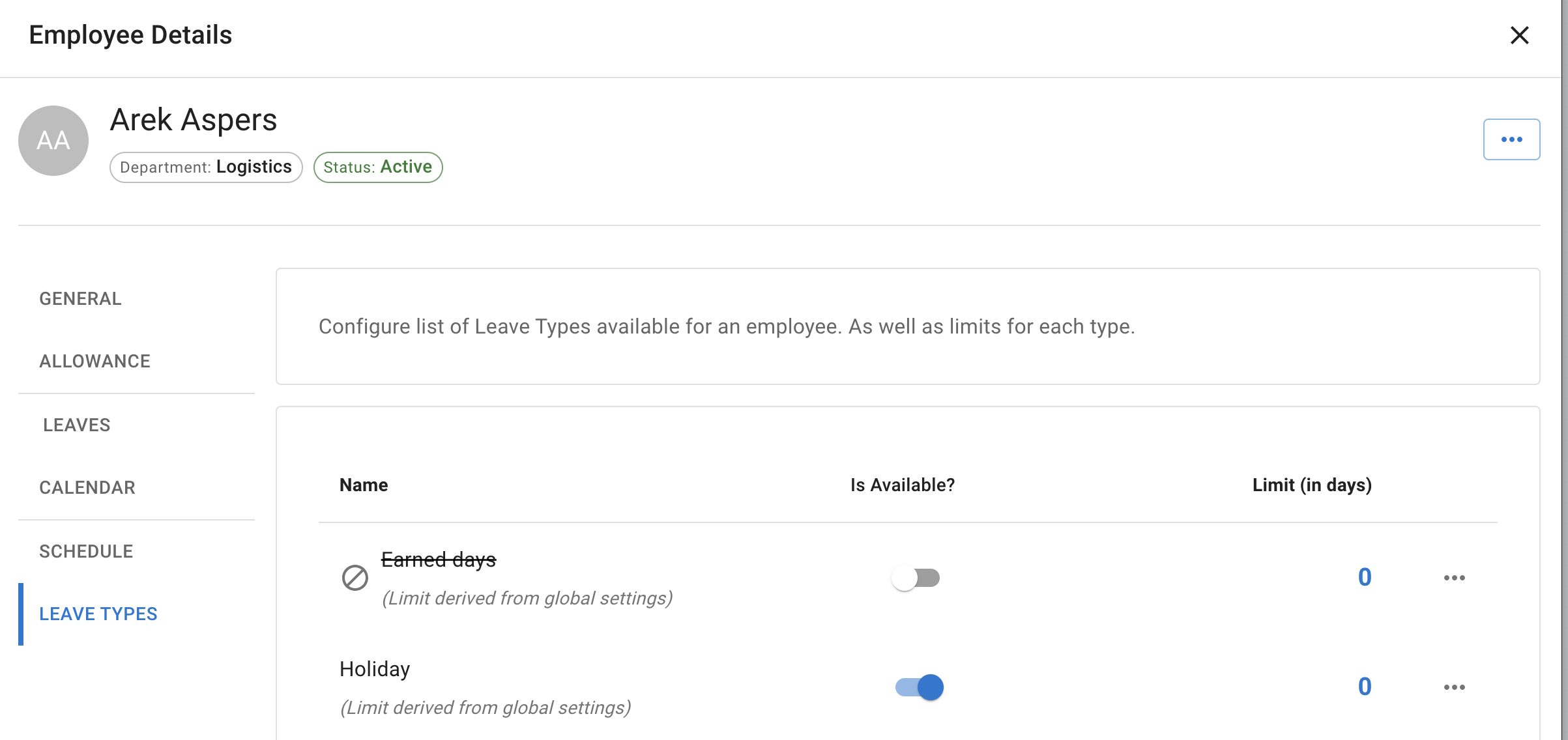
- Open the Leave types tab.
- Switch Is Available? off for the leave types that should be blocked.
- Save the changes.
The tab lists every leave type with an Is Available? switch and a Limit (in days) beside it, so the same screen handles both blocking a leave type and giving that person a different limit for it.
After saving, the employee will no longer be able to book the blocked leave types.
The leave types remain available for other employees unless they are also blocked or restricted by policy.
If a Leave Access policy covers the employee
Where a Leave Access policy governs an employee, this tab says so and lists only the leave types that policy has granted them. Change what they can use by editing the policy rather than this tab.
Read more: Employee policies - Leave access
If an employee has no leave types left
If every leave type ends up switched off for someone, the tab warns you. That employee cannot request leave at all until at least one is switched back on.
What employees see
When a leave type is blocked for an employee, it is not offered to them when they request leave.
This helps employees choose from only the leave types that apply to them.
What admins and managers see
A blocked leave type is not silently missing when somebody books on that employee’s behalf. It still appears in the Leave Type list, marked (disabled), so the person booking can see it exists and has been switched off rather than wondering where it went.
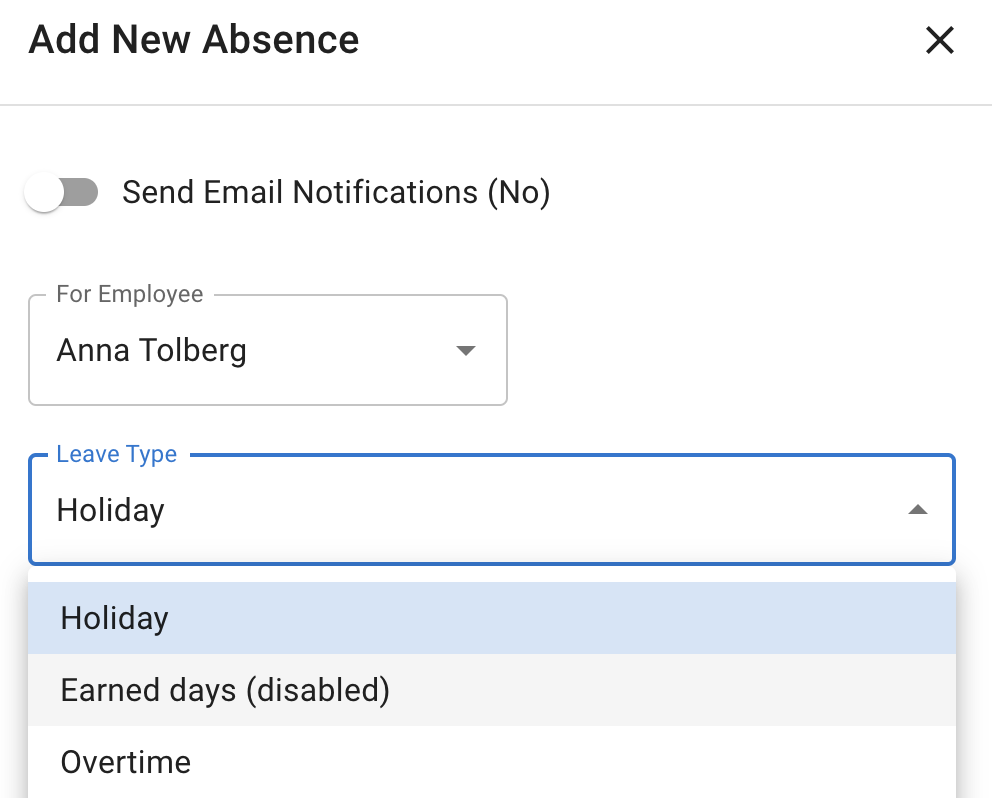
Whether a manager may actually go ahead and use a disabled leave type is a separate, company-level setting. Employees never get a blocked leave type for themselves either way.
Blocking leave types does not delete them
Blocking a leave type for one employee does not delete the leave type.
It also does not archive it.
The leave type remains in your company account and can still be used by other employees.
If a leave type is no longer needed for anyone, archive it instead.
Read more: Leave types
Example
Your company has a leave type called TOIL.
Most salaried employees should not be able to book TOIL, but one hourly team uses it.
You can either:
- use Leave Access policy to make TOIL available only to the right group, or
- block TOIL for selected employees who should not use it
For one-off exceptions, blocking the leave type may be enough.
For a wider company rule, use Leave Access policy.
Best practice
Use Leave Access policy for departments, locations, or groups of employees.
Use Block selected leave types for individual exceptions.
Keep leave options simple so employees only see the leave types they are allowed to use.