
Schedules, rotas and working patterns
Calculate leave around real working patterns.
Use schedules and rota patterns to calculate how much leave a request uses — especially for part-time staff, rota-based teams and non-standard working weeks.
30-day free trial · No credit card required · UK-hosted · UK support
- Working schedules
- Rota patterns
- Start from date
Working pattern setup
Leave usage should follow when people actually work.
A schedule does not change how much leave someone is entitled to. Their allowance stays the number of days set on their record — the schedule decides how much of it a request actually uses.
Working schedules
Set one default working week for the company, then give an employee their own when it differs.
Rota patterns
Use a repeating cycle of days for teams whose pattern is not a Monday-to-Sunday week.
Start from date
Add a new schedule or rota from the date it begins.
Usage calculation
Calculate used leave from the correct working pattern.
Working schedules
Set the days and hours each employee works.
Not everyone works Monday to Friday. TimeOff uses each employee's schedule to understand which days count when they book leave. Showing or booking leave in hours is switched on separately — the schedule is what tells TimeOff how long that person's day actually is.
- Part-time patterns for employees who work fewer days each week.
- Compressed or non-standard weeks where working days are different from the company default.
- Working hours so a day means the right number of hours for that person, not a company-wide assumption.
- Four longer days or five shorter ones — the day length sits on the person, so a compressed week is as easy to express as a part-time one.
Standard schedule
Sophia works Monday, Tuesday, Thursday and Friday.
- Mon 7.5h
- Tue 7.5h
- Wed OFF
- Thu 7.5h
- Fri 7.5h
- Sat OFF
- Sun OFF
30h / week
Rota patterns
Support teams with repeating rota patterns.
For shift-based teams a working week is not a week. A rota is a repeating cycle of days, anchored to the date it starts — so a four-on-four-off pattern, or a nine-day fortnight, repeats the way it actually runs instead of being forced into Monday-to-Sunday. Rotas are set on the employee, so people on different cycles can sit in the same team.
- Cycles that are not week-shaped as well as ones that are.
- Anchored to a start date so the cycle lands on the right days.
- Built for operational teams such as warehouse, care, retail and support.
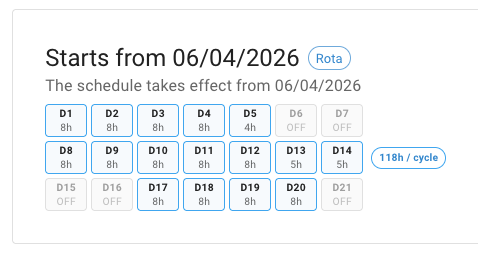
Start from date
Start a new schedule or rota from the right date.
When someone's working pattern changes, add the new schedule or rota from the date it starts. Leave before that date keeps following the old pattern, and leave after it follows the new one.
- Add a weekly schedule or a rota schedule when someone moves role, hours, contract or cycle.
- Earlier leave keeps its figures when you add a new schedule from the date the change happens, rather than editing the existing one.
- Queue a change you already know about — an employee can hold more than one dated schedule at a time.
- Admins and managers both maintain a person's pattern, so one administrator is never the bottleneck.
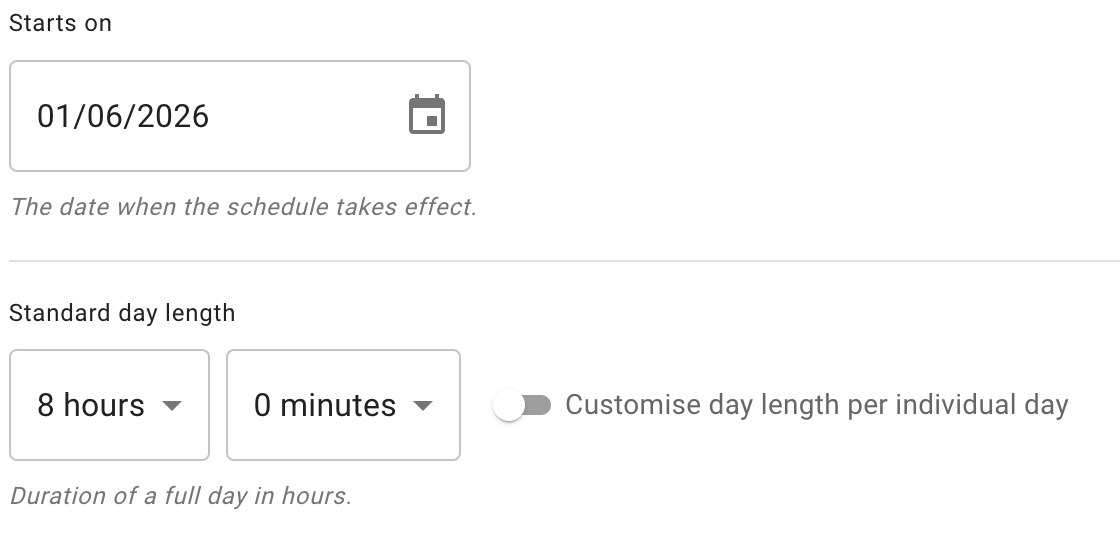
Leave usage calculation
Calculate used leave more accurately.
When an employee books leave, TimeOff checks the relevant schedule or rota and counts only the working time that should be counted.
- Non-working days are not counted as used leave.
- A day shorter than the standard day length counts as part of a day, not a whole one.
- Bank holidays and non-working days are taken into account, so a request that spans them does not overcount.
- Used and available figures make more sense for non-standard workers.
Leave calculation
Request: Monday to Friday
- Standard day length 7.5h
- Scheduled working days 4
- Non-working days 1
- Leave used 4 days
A better fit for people who do not all work the same week.
TimeOff uses schedules, rota patterns and effective dates to calculate leave usage around the employee's real working pattern. All of it is included on every account, at one published price per person, per month — no tiers, no add-ons, nothing to unlock.
Schedules
Set the normal days or hours an employee works.
Rotas
Use a repeating cycle for shift-based teams.
Effective dates
Start a new schedule or rota from the correct date.
Usage calculation
Count leave against scheduled working time.
Common questions
Working-pattern questions we are asked most.
- Do schedules and rotas change how much leave someone is entitled to?
- No. An allowance is a number of days held on the employee's record, and it stays what you set it to. The schedule or rota decides how much of that allowance a particular request uses — so a part-time employee booking Monday to Friday spends only the days they were actually due to work. It is worth being clear about the direction: TimeOff does not read a working pattern and pro-rate an allowance from it. You set the allowance; the working pattern governs what each request spends against it.
- What is the difference between a weekly schedule and a rota?
- A weekly schedule is the fixed kind: the same days every week, Monday to Sunday, with the hours you give each one. A rota is a repeating cycle of days anchored to the date it starts, and the cycle can be any length — it does not have to be a whole number of weeks, which is what makes a four-on-four-off pattern or a nine-day fortnight expressible rather than approximated. Use a weekly schedule when the same week repeats, and a rota when it does not.
- Does every employee need their own schedule?
- No. A company sets one default working week and everybody follows it until they are given something else. You only add a schedule to an individual when their pattern differs from that default — a part-time week, a compressed week, or a rota for someone on shifts. That is also why there is no bulk setup step before people can start booking leave: most employees never need a schedule of their own.
- What happens when someone's working pattern changes part-way through the year?
- Add the new schedule or rota from the date the change takes effect, rather than editing the one they are on. Leave before that date keeps following the old pattern and leave after it follows the new one, so earlier figures keep their meaning. An employee can hold more than one dated schedule at a time, so a change you already know about can go in now. Administrators and managers can both make the change.
- Can a rota be applied to a whole team, department or location?
- No — a schedule or a rota belongs to the employee, and is set on their record. In practice that is finer-grained rather than more work: people on different cycles can sit in the same team without anyone having to split the team up, and a warehouse where three people work a different cycle from the other twelve is just three records. Departments and locations govern plenty of other things in TimeOff, but not working patterns.
- How does a short working day count?
- It depends on that person's standard day length — the duration of a full day for them, which their schedule can set per day. A day shorter than that standard counts as part of a day, not a whole one. A deliberately short day whose standard is equally short is simply a full day for them. Showing or booking leave in hours rather than days is a separate setting, switched on independently of the schedule; the schedule's job is to tell TimeOff how long that person's day actually is.
- What happens to bank holidays and non-working days inside a leave request?
- They are taken into account, so a request spanning them does not overcount. A weekend is not a special case here: Saturday and Sunday are simply days with no hours in that person's schedule, exactly like a part-timer's Wednesday. That is why someone working Tuesday to Saturday needs no special handling — their Sunday and Monday are non-working days in the same way a Monday-to-Friday employee's Saturday and Sunday are.
Set up around the way your company works.
A 5-star Google review from a company that came to TimeOff with its own requirements and worked through them during onboarding.
Amazing team with an impressive response time. We are just getting started with the TimeOff app, and their support has already been outstanding. They have been extremely helpful throughout our onboarding process, including taking the time to join live sessions, listen to our company’s needs, and help us understand how the app can support our custom requirements. Even while we were only testing the application, they treated us with great respect and dedication. The app works very well and truly checks all the boxes for what we need. It is also an excellent value for the quality of both the product and the support provided. Highly recommended for any company out there looking for a similar tool.
Calculate leave around the way people actually work.
Set schedules and rota patterns so used leave reflects the employee's working pattern, from part-time hours to rota-based teams.
30-day free trial · No credit card required · Cancel anytime