
Leave type rules
Set clear rules for every leave type.
Set the limits and notice rules behind each leave type, and decide which types spend allowance. TimeOff applies the checks when a request is submitted, before a manager has to look at it.
30-day free trial · No credit card required · UK-hosted · UK support
- Leave type limits
- Notice rules
- Automatic checks
Rule checks
Keep the normal request flow clean.
Employees can see what is left before they book, and TimeOff checks the rest when they submit — so the common problems are settled before a request reaches a manager.
Leave type limits
Cap the leave types that should only be used up to a point.
Request rules
Check advance notice, and the dates a request is allowed to sit inside.
Allowance link
Decide which leave types spend allowance, which add to it, and which leave it alone.
Before approval
Settle the everyday problems on the request, not in a manager's inbox.
Leave type limits
Set a limit on the leave types that need one.
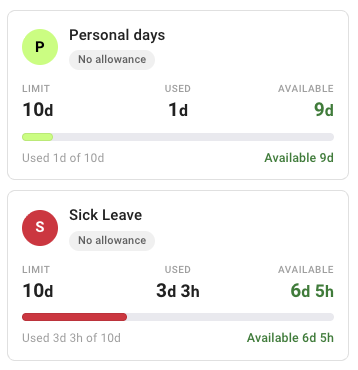
Some leave types should only be used up to a point. TimeOff checks that limit when the request is made, before it creates work for a manager. A limit is separate from allowance, so a type can be capped without any of it coming out of someone's allowance.
- A limit per leave type — for the ones that should only be used up to a point, such as working from home or personal days. It runs per leave year, or over a rolling window.
- Clear remaining amounts so employees can see what is still available before they request it.
- Stop requests over the limit — or let specific people go past it, if that is the exception you need.
- Override it for one person where someone's limit is genuinely different, without changing it for everybody.
Request rules
Check advance notice and dates when a request is submitted.
A leave type can require notice before it is booked, and an employee's request has to sit inside the dates they are actually allowed to book. Both are checked when the request is submitted, not when a manager finally gets to it.
- Advance notice, as a fixed period or as a multiple of the leave's own length — so a fortnight off needs more warning than an afternoon.
- Sensible date boundaries, so employees cannot book far outside the current leave year, or outside their own employment dates. Admins are not restricted.
- Notice does not hold up a booking made for someone — an admin or a manager entering leave on an employee's behalf is not blocked by it.
Request check
A request is checked against the rules that apply to it.
- Advance notice Fixed, or scaled to the length
- Booking dates Within range
- Employment dates Within range
Allowance-linked or tracked separately
Decide what each leave type does to allowance.
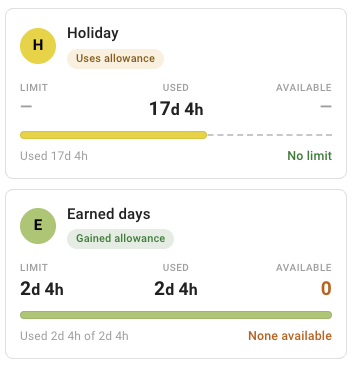
Not every leave type should reduce allowance. A leave type that runs per leave year either spends allowance, has no effect on it, or adds to it — and that choice is independent of whether the type carries a limit.
- Holiday can use allowance and update the employee's balance.
- Sick leave or working from home can be tracked separately.
- Earned leave can be shown separately where it adds or tracks time rather than taking from allowance.
- A rate you set on leave that adds to allowance, so an hour of the type can be worth more, or less, than an hour of allowance.
Automatic checks
Show the issue before the request moves on.
The checks run on the request itself, the moment it is submitted — so a manager only sees requests that follow your rules, or that genuinely need a decision.
- Not enough allowance — a request that does not fit can be turned away, or allowed through if that is how you work.
- Leave type limit reached — the same choice, company-wide or for one employee.
- Request outside the rules — notice periods and date rules are checked before the request goes anywhere.
Request validation
- Allowance available OK
- Leave type limit Reached
- Advance notice Check needed
- Dates Within range
Rules that reduce avoidable admin.
Leave type checks keep everyday requests cleaner by checking limits, notice rules, allowance and the everyday booking mistakes, before approval. Every one of them is included on every account, at one published price per person, per month.
Limits
Cap a leave type, and decide who may go past the cap.
Notice rules
Require advance notice as a fixed period, or in proportion to the leave itself.
Allowance link
Set which leave types spend allowance, which add to it, and which have no effect.
Validation
Settle the everyday problems on the request, before it reaches a manager.
Common questions
Leave type questions we are asked most.
- Can I limit how much of a leave type someone can take?
- Yes. A leave type can carry its own limit, separate from the main allowance — so sick leave or working from home can be capped without touching anyone's allowance. The limit belongs to each employee rather than to a shared company pool, and it can run per leave year or over a rolling window. On a leave type that runs per leave year, leaving the limit blank means no cap at all.
- Does TimeOff stop a request that breaks a rule?
- That is your choice. Advance notice and date rules are checked when a request is submitted. For the two things companies most often want flexibility on — going past someone's remaining allowance, and going past a leave type's limit — you decide whether a request is turned away or allowed through, both for the company as a whole and for individual employees.
- Can I require advance notice on a leave type?
- Yes, and in two ways. Advance notice can be a fixed period, or a multiple of the leave's own length, so a longer booking automatically needs proportionally more warning than a short one. It is set on the leave type itself. It does not hold up an admin or a manager entering leave on someone else's behalf, which is what lets agreed leave be recorded after the fact.
- Can one employee have a different limit from everyone else?
- Yes. The limit set on the leave type is the default for everybody, and it can be overridden for an individual from that employee's own record — so one person can have a different cap without you changing it for the whole company. Whether someone may go past their limit at all is a separate choice, and it can also be set per person.
- Does a leave type limit come out of the main allowance?
- Not unless you want it to. A leave type that runs per leave year either deducts from allowance, has no effect on it, or adds to it, and that choice is independent of whether the type carries a limit. So working from home can be capped at a set number of days a year while leaving everyone's allowance untouched, and leave that adds to allowance can do so at a rate you set.
- Can employees book leave in the past?
- Only within limits. Employees can book inside a window around the current leave year, and only inside their own employment dates — they cannot request leave from before they joined or after their last day. Admins are not restricted, which is why historic corrections are usually entered by an admin rather than by the employee.
- What happens to a leave type we no longer use?
- Archive it. An archived leave type cannot be selected for new leave requests, and existing leave is unaffected — it stays on calendars, in reports and in everyone's history exactly as it was. Deleting a leave type is refused once leave has been booked against it, which is why archiving is the normal way to retire one.
Simple rules that do the job.
“Easy to configure, affordable - simply do the job !!”
Automate the checks behind each leave type.
Set leave type limits and request rules so employees get clearer feedback and managers spend less time declining avoidable requests.
30-day free trial · No credit card required · Cancel anytime