
Excel leave tracker alternative
Replace your Excel leave tracker. Not your whole way of working.
Give employees one place to check balances and request leave. Give managers the context to decide. Keep the records together—without updating a tracker after every decision.
$1.50 per user / month. Every TimeOff feature. See your team’s cost
- 30-day free trial
- No credit card required
- Cancel anytime
- UK-hosted · UK support
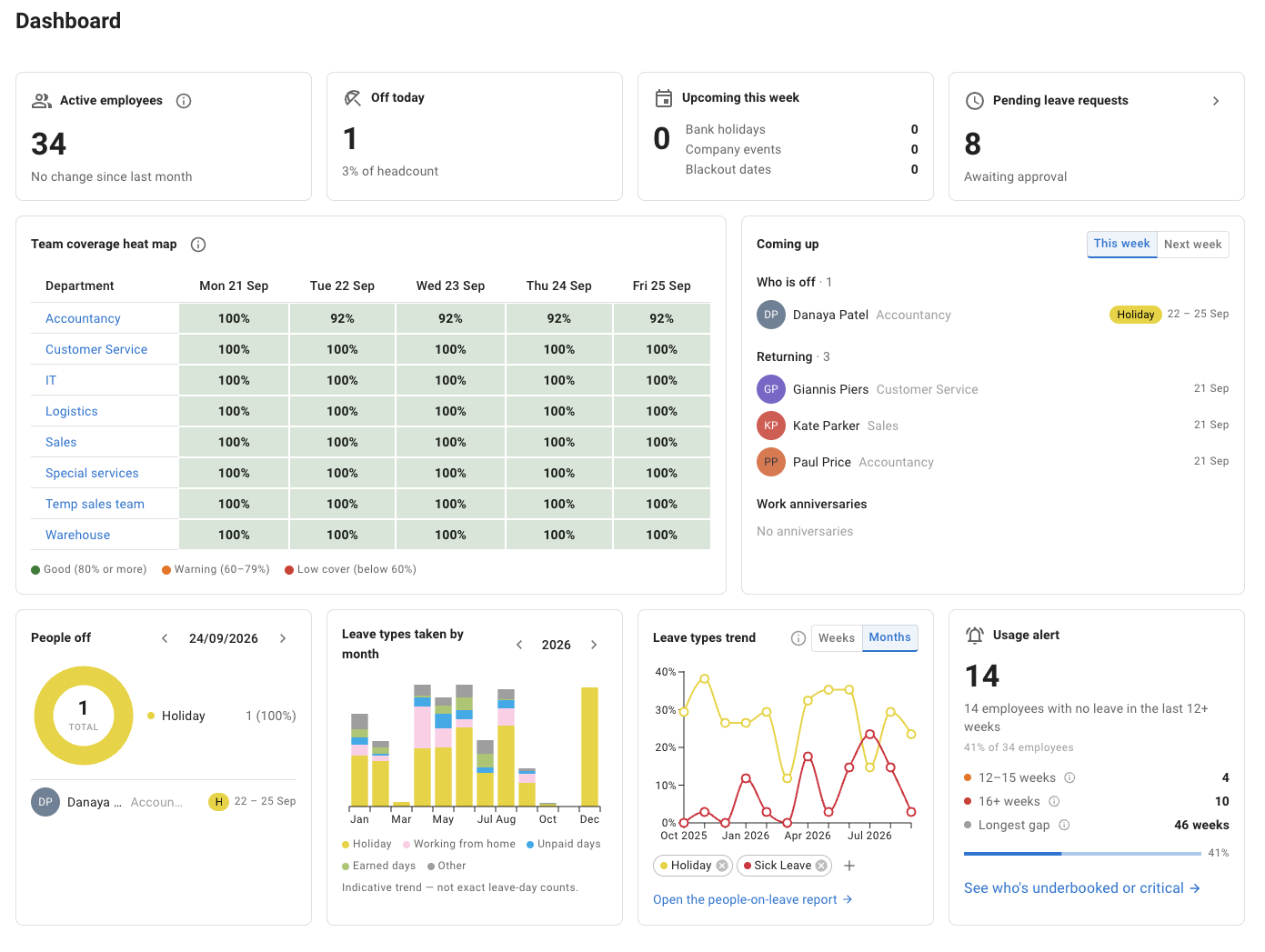
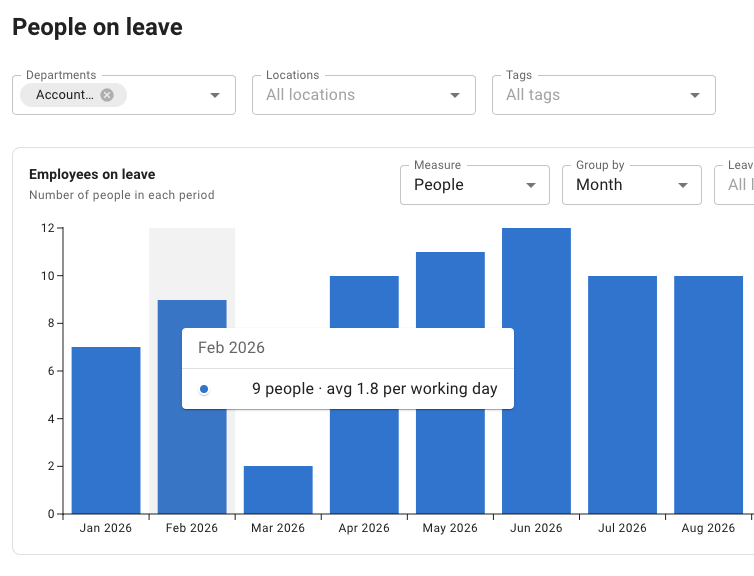
People on leave report
TimeOff vs a manually maintained spreadsheet
The same leave information. Less work moving it around.
Excel can hold the numbers. The decision is who keeps requests, decisions and records connected.
Source: Excel formulas (opens in a new tab) · checked
| Everyday task | Excel leave tracker Maintained by your team Checked | TimeOff. |
|---|---|---|
| Leave balances | Formulas calculate balances from the data entered. Source: Excel formulas (opens in a new tab) | Balances follow your configured allowance and leave records. |
| Employee requests | Enter requests in the workbook, or collect them elsewhere. Sources: Entering data in Excel (opens in a new tab), Microsoft Forms and Excel (opens in a new tab) | Employees check balances and request leave in their own account. |
| Manager decisions | Record decisions manually, or build an approval workflow. Source: Power Automate approvals (opens in a new tab) | Review requests, add comments and record the decision together. |
| Who is away | Use a calendar layout, colours or conditional formatting. Source: Conditional formatting (opens in a new tab) | View recorded leave and pending requests in a shared calendar. You choose who can see it. |
| Reports and analysis | Filter the workbook and use formulas or charts. Sources: Filtering in Excel (opens in a new tab), Excel charts (opens in a new tab) | Filter leave reports and export CSV files for further analysis. |
| Working together | Co-author a shared workbook with a supported cloud setup. Source: Excel co-authoring (opens in a new tab) | Use employee and manager access within a dedicated leave system. |
This is not a claim that Excel cannot be automated. Excel supports formulas and cloud co-authoring. Power Automate can add leave-approval workflows. Here, we compare a manually maintained tracker with a configured leave-management system—not every possible Microsoft 365 solution.
Sources: Excel formulas (opens in a new tab) · Excel co-authoring (opens in a new tab) · Power Automate approvals (opens in a new tab) · checked
A clear view for every role
Employee balances, manager decisions and administrator reports.
Actual TimeOff screenshots. Use the links above to explore each view.
For the employee
“How many days do I have left?” Now they can check.
Employees see their own balance, choose their dates and send a leave request from desktop or mobile.
They can follow its status in the same place. You do not need to answer each balance question or copy a request from an email into a tracker.
The Booked so far view brings leave-type usage and available amounts together.
My leave
Actual screenshot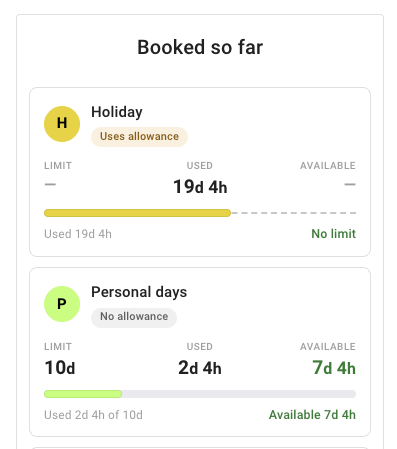
Leave used and available, by leave type.
For the manager
Decide with the team picture in view.
See who else is away before you approve. Keep the decision and any comment with the request.
The request stays part of the leave record, so you do not need to approve in one place and separately update a calendar and spreadsheet.
The “Also off” section lists colleagues with approved leave on the same dates—everyone the manager can see on Team View—beside the request details, cost and currently available balance.
Review with context
Actual screenshot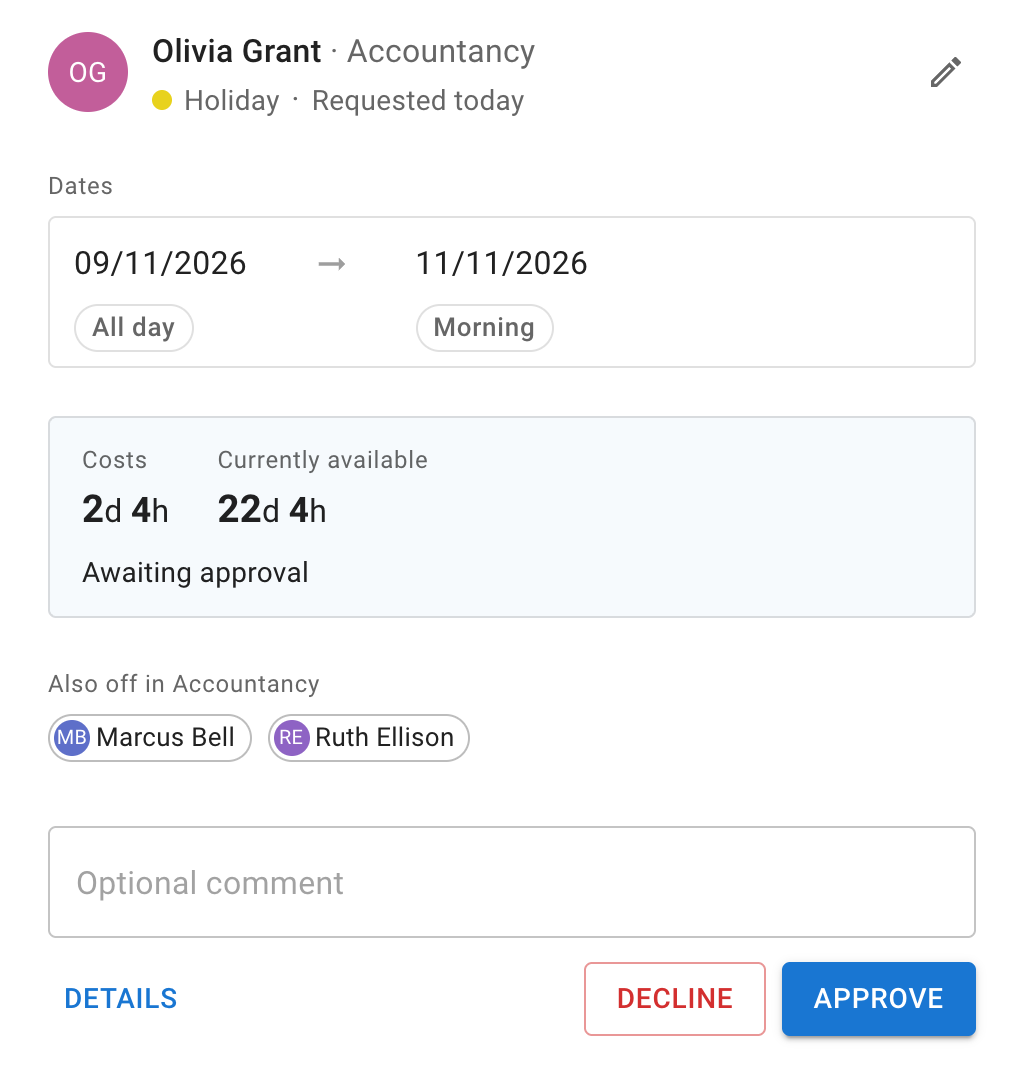
Request details and “Also off”, together.
For the administrator
The report starts with the records you already have.
Filter leave by date, department, leave type or location. Export the records when you need them for internal review.
Review employee leave records with their dates, leave types and status—without rebuilding a separate reporting sheet.
You can still use Excel for further analysis. TimeOff exports CSV data; that is not an automatic payroll integration or a live two-way workbook sync.
Leave report
Actual screenshot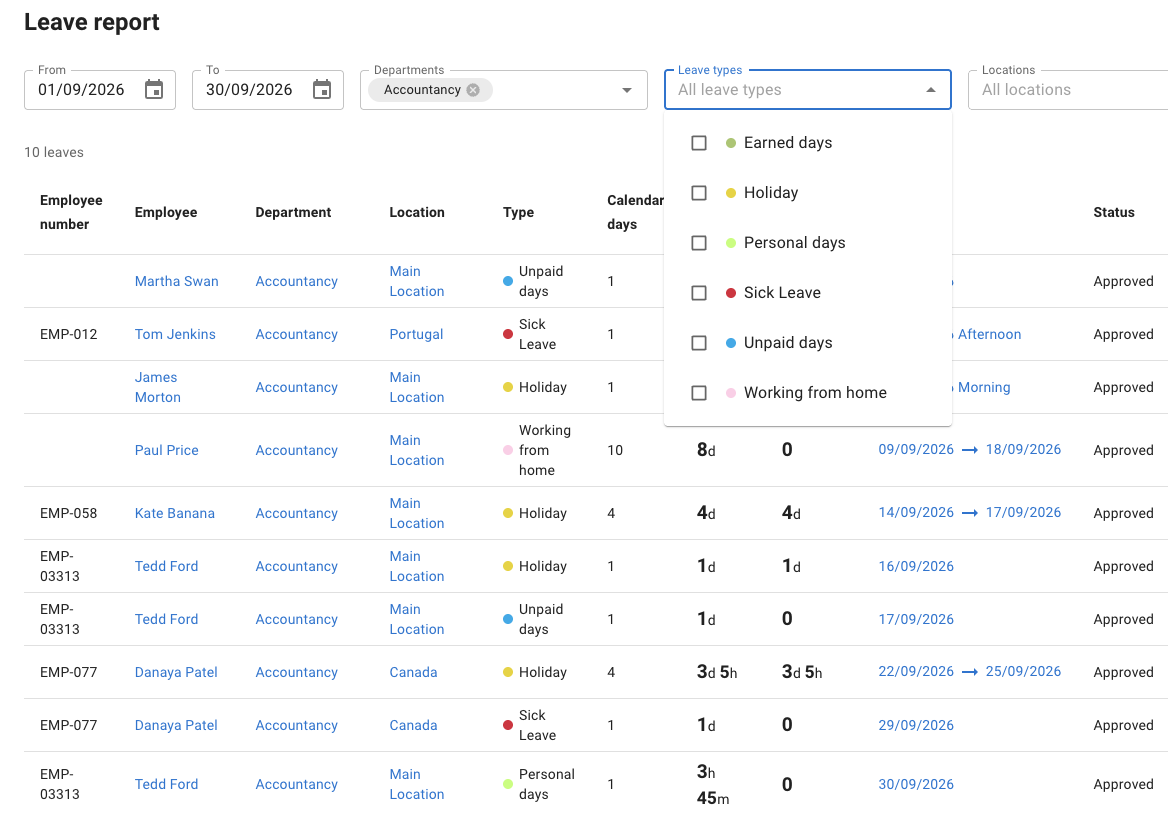
Keep Excel for analysis. Export when needed.
Keep what already works
You do not need to stop using Excel.
Move the leave process when maintaining it becomes the problem—not just because it happens to live in a spreadsheet.
A workbook may still suit you
Your requests are manageable, the tracker stays current, and someone can maintain its formulas, access and any automation.
Shared editing and custom workflows are real options. A dedicated leave system is not the only way to organise the process.
Sources: Excel co-authoring (opens in a new tab) · Power Automate approvals (opens in a new tab) · checked
A leave system may be the next step
You want employees to check and request for themselves, managers to decide with context, and reporting to start from the same leave records.
Keep Excel for your own analysis. Use TimeOff for the day-to-day leave workflow.
A real move from an Excel tracker
Start with the records you trust.
Bring your current tracker to a demo. Talk through the balances and future bookings you need represented, then test a small group before a wider rollout.
“Switching to TimeOff Management after years of using an Excel spreadsheet was a great decision for our small team…”
-
Agree a starting point
Choose a cutover date and keep a copy of the existing workbook for reference.
-
Check the starting balances
Review allowance, leave already taken and future bookings before inviting everyone.
-
Try the complete workflow
Use a few employees to test requests, decisions and records during the trial.
One plan. A clear monthly cost.
A dedicated leave workflow. One clear price.
Every TimeOff feature is included at one published price.
$1.50 per user
per month · USD
- Every feature included
- No setup fee
- 30-day free trial
Already paying for Excel?
TimeOff is an additional subscription, not a saving on your Microsoft licence. Decide whether a dedicated leave workflow is worth the cost for your team.
Your team’s TimeOff cost
Monthly · USDThe calculator needs JavaScript. The cost below is for 25 employees.
TimeOff.Management
$37.50 / month
25 employees × $1.50
Monthly billing uses the number of employees in the system on the last day of the billing month.
Try the complete workflow during the 30-day free trial before subscribing.
Start 30-day free trialCommon questions
Moving leave out of a spreadsheet
- Can we keep using Excel alongside TimeOff?
-
Yes. Administrators can download the Leave report and the Allowance snapshot report as CSV files and keep analysing leave in Excel. It is a file you download, not a live two-way sync with your workbook or an automatic payroll integration.
- Do employees need Excel or a Microsoft licence to use TimeOff?
-
No. Each employee signs in to their own TimeOff account in a web browser, on a computer or a phone, to check their allowance, request leave and follow its status.
- Can managers see who else is off before they approve?
-
Yes. A pending request lists the colleagues who already have approved leave on the same dates, under “Also off”, beside the request’s cost and the employee’s currently available balance. It shows the people the manager can see on Team View, and you choose who that is in your company settings.
- What should we check before we move off our spreadsheet?
-
Agree a cutover date and keep a copy of the workbook. Check each employee’s allowance, the leave they have already taken and their future bookings before you invite everyone, then test requests and approvals with a few employees during your 30-day free trial. You can bring your current tracker to a demo to talk it through.
- How much does TimeOff cost if we already pay for Excel?
-
TimeOff is $1.50 per user per month, with every feature included and no setup fee, billed on the number of employees in the system on the last day of your billing month. It is a subscription on top of any Microsoft licence you already have, not a saving on it.
See the difference with your own workflow
Try one real leave policy. Then decide whether to switch.
Check a balance, request leave, review it and export a report during your trial. Or bring your current process to a demo.
Full feature access. No credit card required. Cancel anytime.
Comparison checked · Scope and sources
This page compares a manually maintained Excel leave tracker with a configured TimeOff leave-management workflow. It is not a comparison of all Microsoft 365 capabilities. Excel formulas, supported cloud collaboration and Power Automate approval workflows are explicitly acknowledged.
The hero and all three role sections use screenshots of TimeOff. These are separate product examples, not one shared employee or request. The controls inside the images are static; enlarging an image does not book, approve or export anything. The customer quote describes one customer’s experience, not a guaranteed migration outcome.
TimeOff pricing is in USD. This page does not estimate an Excel licence cost, labour savings or return on investment. Product information and rates may change.
Microsoft’s published pages
- Microsoft: overview of formulas in Excel (opens in a new tab)
- Microsoft: co-authoring Excel workbooks (opens in a new tab)
- Microsoft: approval workflows with Power Automate (opens in a new tab)
- Microsoft: Forms responses in Excel (opens in a new tab)
- Microsoft: entering data in worksheet cells (opens in a new tab)
- Microsoft: conditional formatting in Excel (opens in a new tab)
- Microsoft: filtering data in Excel (opens in a new tab)
- Microsoft: creating a chart in Excel (opens in a new tab)