
TimeOff vs Breathe HR
A Breathe HR alternative that keeps the focus on leave.
Holiday booking, repeating rotas and timely leave-usage reminders—without replacing the HR processes that already work for you.
Every TimeOff feature. £1 per user / month. Compare the pricing models
- 30-day free trial
- No credit card required
- Cancel anytime
- UK-hosted · UK support
People on leave report
TimeOff vs Breathe HR
The leave-management essentials, covered.
A focused leave tool should still handle the everyday work. Both products cover these core tasks, from booking a holiday to checking balances and reviewing absence.
Source: Breathe holiday planner (opens in a new tab) · checked
| Core leave-management feature | TimeOff. | Breathe HR Core HR plans Checked |
|---|---|---|
| Employee holiday requests and manager approvals | Included | Included Source: Holiday planner (opens in a new tab) |
| Allowances and remaining balances | Included | Included Source: Holiday planner (opens in a new tab) |
| Holiday, sickness and other absence records | Included | Included Source: Holiday planner (opens in a new tab) |
| Shared team calendar showing who is away | Included | Included Source: Holiday planner (opens in a new tab) |
| Leave in days or hours | Included | Included Source: Irregular patterns guide (opens in a new tab) |
| Individual weekly working patterns | Included | Included Source: Working patterns guide (opens in a new tab) |
| Leave reporting and data export | Included CSV exports from supported reports | Included Reports can be sent to ExcelSource: Reporting page (opens in a new tab) |
“Included” means the capability is available, not that the products work identically. Permissions, settings and report formats differ. Breathe’s leave management is included on every core HR plan; Rota, Time & Attendance is a separately priced add-on.
Sources: Breathe: what’s included (opens in a new tab) · Breathe pricing (opens in a new tab) · checked
Then choose the scope and detail you need.
The choice is not whether either product can book leave. It is whether you want wider HR administration in the same system, how your working patterns are handled, and which planning tools and price model fit.
Choose what you need to change
Improve leave management. Keep the rest of HR where it works.
Already happy with how you manage contracts, payroll and performance reviews? You do not have to move those processes to get a dedicated leave system.
TimeOff brings requests, balances, working patterns and leave reports together. Employees can check their allowance and book time off; managers can review requests with the team calendar in view.
Add payroll references or cost centres to supported leave reports and their CSV exports. Match leave records to the identifiers you already use for payroll checks. This is a file export, not automatic payroll synchronisation.
Your leave system
TimeOff.Management
Focused on leave- Requests & balances Everyday holiday booking
- Schedules & rotas Leave around working time
- Reports & reminders Plan how leave is used
- Your leave policies Settings to suit your team
Custom fields in a leave export Illustrative example
| Employee | Payroll ref. | Allowance used |
|---|---|---|
| Alex Morgan | PAY-2042 | 8 days |
Separate processes can stay separate
Your existing HR arrangements
- Contracts
- Payroll
- Performance reviews
Keep using the systems and processes that already work for you.
Look ahead, not just back
Notice who needs a break. Then send a timely reminder.
A remaining balance is only part of the picture. See who is behind on booking leave and who has gone a long time without a break.
TimeOff’s Leave usage alert separates booking pace from recency. Review the people who need attention and choose whom to remind. These reminders are sent by a person, not automatically.
Use the Dashboard for the current picture and focused reports for the detail. These tools are included in the single TimeOff plan.
Leave usage alert
Illustrative example2 employees
Review the context.
Choose the next step.
- Alex Morgan 8 days booked · last leave 18 weeks ago Critical
- Jordan Lee 10 days booked · last leave 13 weeks ago Underbooked
- Helen Stone 19 days booked · last leave 4 weeks ago On track
- Kate Parker 20 days booked · last leave 3 weeks ago On track
Showing 2 people who may need a reminder.
To: Alex Morgan
Hi Alex,
[An email encouraging Alex to plan and book their remaining leave, with their allowance, what they have booked so far and what is left to book.]
Preview only. No email is sent.Sample people, not a live report. Booked amounts count approved leave only. Booking pace and time since leave are separate checks.
You decide when a reminder is helpful.
Leave usage alert guideDifferent people. Different working time.
Let the working pattern do the holiday maths.
Office staff, part-time colleagues and people on a repeating rota should not all have leave deducted against the same working week.
Set individual weekly schedules or a day-based repeating cycle, with an effective date when a new pattern starts. TimeOff calculates leave usage from the scheduled working time. The allowance itself is set separately.
Same dates. Your actual working time.
Illustrative exampleEmployee working pattern Four-on-four-off · 8-hour days
Holiday requested: 5–12 October 2026 8 calendar days · Monday to the following Monday
- Mon
5 8h Work - Tue
6 8h Work - Wed
7 8h Work - Thu
8 8h Work - Fri
9 OFF Rest - Sat
10 OFF Rest - Sun
11 OFF Rest - Mon
12 OFF Rest
Deducted from allowance
4 days
32 scheduled hours ÷ 8-hour standard day = 4 days. No bank holidays in this example. This is usage, not entitlement.
The same dates need not mean the same deduction.
Rota set-up guideThe rest of your leave rules still matter
Need a more detailed policy? That is included too.
The examples above are not the limits of TimeOff. Explore the other controls your policy may need.
One plan. Per user.
Compare the price model, not just the price tag.
£1 per user
per month
Every TimeOff feature is included. Your monthly charge follows the number of employees in the system on the last day of your billing month.
Breathe uses fixed headcount bands.
Add people within a band and the core subscription stays the same. Cross its threshold and the next band applies. Compare both against your actual team size.
Source: Breathe pricing (opens in a new tab) · checked
- 30-day trial
- Every feature
- Monthly billing
Included on every account
- Leave usage alert and reminders
- Weekly schedules and repeating rotas
- Custom fields in CSV exports
- Two-tier leave approvals
- Allowance and accrual rules
- Personal support with your setup
Personal help, from the start
Make the move about better leave management—not another big HR project.
Bring your working patterns, opening balances and reporting questions to a demo. Talk through how to set them up, then test real-life requests during your trial.
“Great system for managing leave, great support and really great value for money.”
-
Bring your arrangements
Discuss allowances, schedules and which information your managers need.
-
Test a working pattern
Check a typical request and the amount deducted before inviting everyone.
-
Review the planning view
Explore usage reports and decide how you would follow up with staff.
Common questions
Comparing TimeOff and Breathe HR
- Is TimeOff a full replacement for Breathe HR?
-
No. TimeOff is dedicated leave management: holiday requests and approvals, allowances, working patterns, leave-usage reminders and leave reports. Breathe brings absence management together with employee records, documents and performance tools, according to its own feature list (checked 30 September 2026). If those HR processes already work for you, keep them where they are and use TimeOff for leave.
Source: Breathe: what’s included (opens in a new tab) · checked
- Can TimeOff remind employees who are not taking their leave?
-
Yes. The Leave usage alert shows who is On track, Underbooked or Critical, and who has had no recent leave. A person chooses whom to remind and can preview the email first; none of these reminders is sent automatically. Only approved leave counts as booked, and the report is included in TimeOff’s single plan.
- How does TimeOff work out leave for part-time staff and rotas?
-
Give each employee a weekly schedule or a repeating rota from the date it starts. Each working day in a request costs its scheduled hours over the standard day length, and days off cost nothing, so the same dates can cost different people different amounts. Leave usage can be shown in days, in hours, or both.
- Can I export leave data with payroll references?
-
Yes. Add custom fields such as a payroll reference or cost centre to employee records, then add them as extra columns on supported reports and in their CSV exports. It is a file export, not an automatic payroll connection.
- How does TimeOff’s pricing compare with Breathe HR’s?
-
TimeOff is £1 per user per month with every feature included, billed on the number of employees in the system on the last day of your billing month. Breathe prices its core HR software in fixed headcount bands, so the price stays the same within a band and changes when your team crosses into the next, according to its pricing page (checked 30 September 2026). Compare both against your own team size.
Source: Breathe pricing (opens in a new tab) · checked
Try your own leave arrangements
Choose the leave system that fits the way you work.
Book a holiday, test a repeating rota and review who needs a reminder. See whether TimeOff is the right fit before you switch.
30 days · Full feature access · No credit card required · Cancel anytime.
Comparison checked · Scope and sources
This comparison covers selected holiday and absence requirements, not the whole Breathe HR suite. Breathe’s leave management is included in its core HR plans; its Rota, Time & Attendance add-on is separate. “Included” confirms availability, not identical functionality. Features, plans and prices can change.
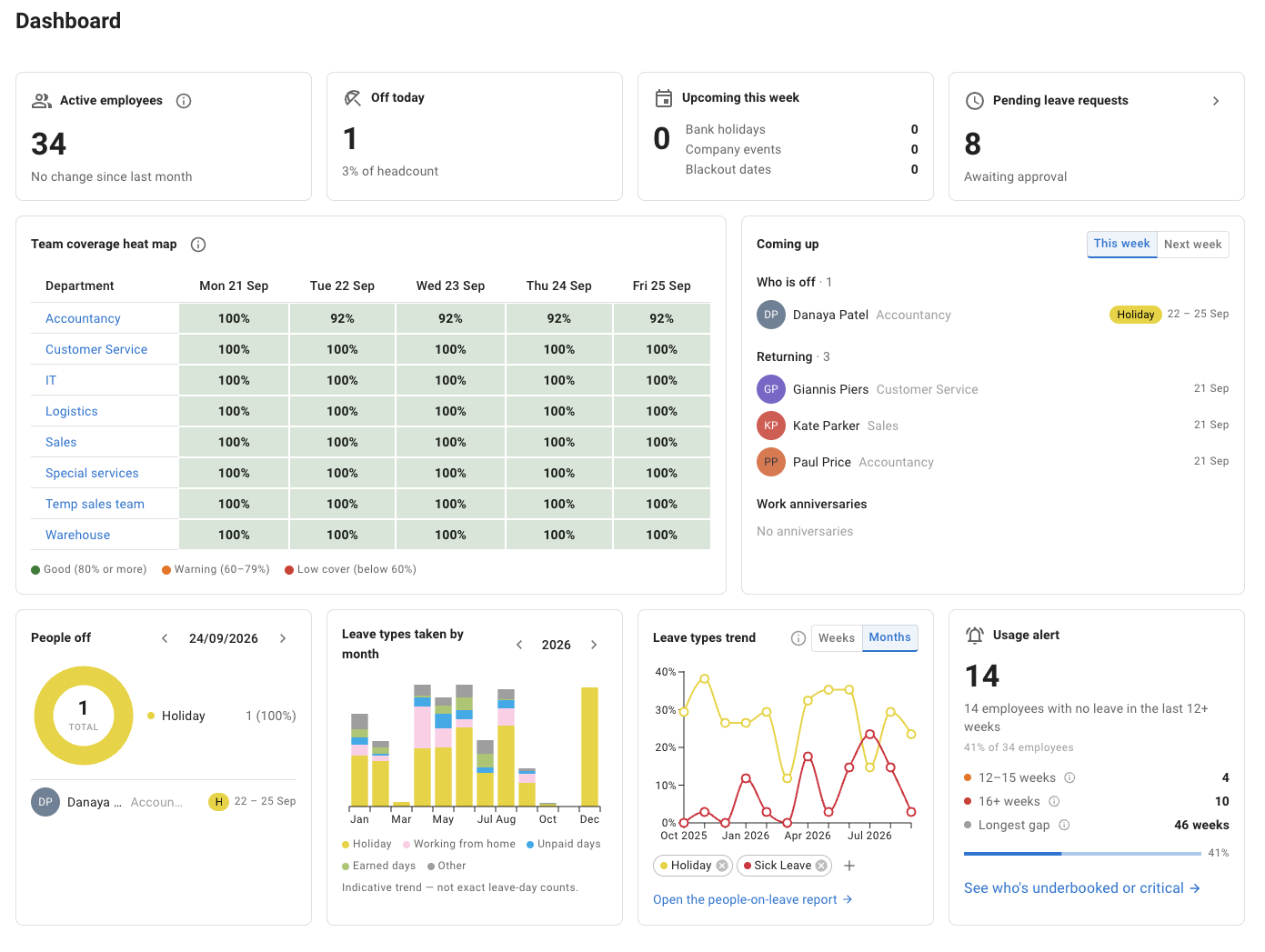
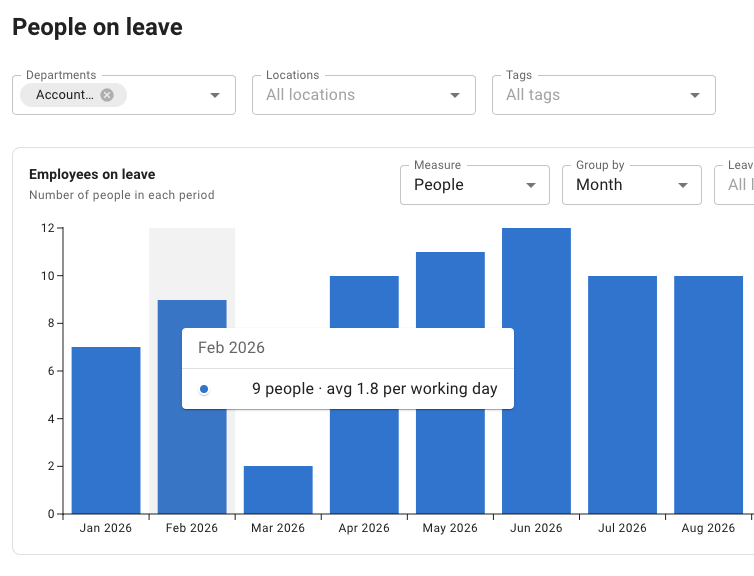
Breathe’s burnout monitor and TimeOff’s Leave usage alert help review leave patterns; neither is a clinical assessment. Working-pattern guidance is scenario-specific. The interactive examples use fictitious data and are illustrations of the stated rules, not exact reproductions of the application. The dashboard and report in the hero are screenshots of TimeOff. The customer review is general feedback about TimeOff, not evidence of a switch from Breathe HR.
Breathe’s published pages
- Breathe: pricing and add-ons (opens in a new tab)
- Breathe: what’s included in core HR (opens in a new tab)
- Breathe: reporting and the burnout monitor (opens in a new tab)
- Breathe: holiday booking, balances and calendar (opens in a new tab)
- Breathe: working patterns (opens in a new tab)
- Breathe: irregular working patterns (opens in a new tab)