
TimeOff vs BambooHR

A BambooHR alternative focused on your PTO.

Show the right leave options, protect busy dates and give teams notice before people are out. Dedicated leave management, without a full HR rollout.

$1.50 per user / month. Every TimeOff feature. Compare the scope and cost

  • 30-day free trial
  • No credit card required
  • Cancel anytime
  • UK-hosted · UK support
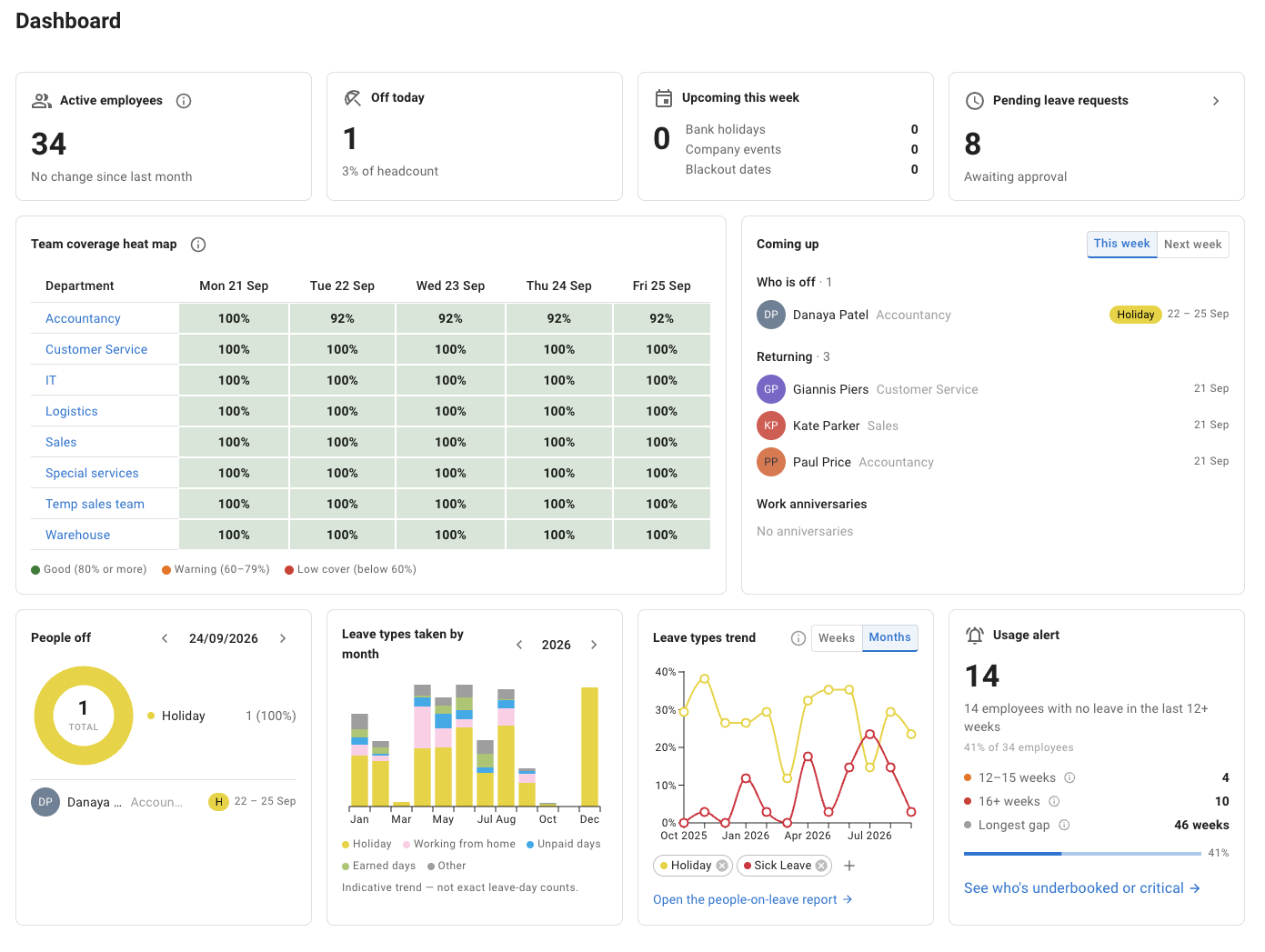
TimeOff dashboard showing active employees, pending leave requests, a team coverage heat map, upcoming leave, people off, leave trends and a usage alert.
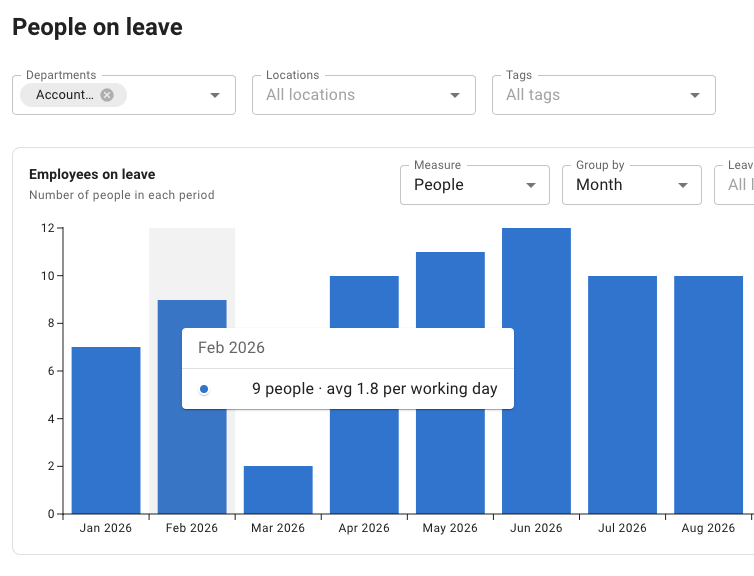
TimeOff people-on-leave report showing monthly employee leave totals.

People on leave report

Enlarge dashboard
TimeOff dashboard showing active employees, pending leave requests, a team coverage heat map, upcoming leave, people off, leave trends and a usage alert.
Enlarge report
TimeOff people-on-leave report showing monthly employee leave totals.

Start with what both products cover

The PTO essentials, covered.

Requests, balances and a view of who is away are the starting point. Both products cover them. BambooHR includes time off in Core—you do not need Pro or Elite just to manage PTO.

Source: BambooHR pricing (opens in a new tab) · checked

Selected leave-management features: TimeOff.Management compared with BambooHR Core.
Everyday leave management TimeOff.ManagementTimeOff One dedicated leave plan BambooHR Core HR plan

Checked

Employee requests and manager approvals Included Included Source: Pricing page (opens in a new tab)
Employee PTO balances Included Included Source: Time-off page (opens in a new tab)
Custom time-off policies Included Included Source: Pricing page (opens in a new tab)
PTO accruals Included Included Source: Pricing page (opens in a new tab)
Shared calendar showing who is away Included Included Source: Pricing page (opens in a new tab)
Time-off reporting Included Included Source: Time-off page (opens in a new tab)
Requesting leave on mobile Mobile-friendly web app Native mobile app Source: App Store listing (opens in a new tab)

Included does not mean identical. Policy settings, reports and integrations differ. This compares leave management, not the full BambooHR platform.

Sources: BambooHR time off (opens in a new tab) · BambooHR pricing (opens in a new tab) · checked

PTO software—or a connected HR platform?

Start with your leave requirements. Then compare how each tool handles your employee groups, busy dates and notifications—and which wider HR functions you would use.

A cleaner request form

Different leave options. The right people see them.

A company-wide list is not always the right list for every employee. Give each group the leave options that apply to it.

TimeOff’s Leave Access policies can follow departments, locations, named employees or tags. In this example, everyone has the base leave types; only people tagged Sabbatical eligible receive the additional option.

Separate privacy settings control what colleagues see on Team View. A sensitive leave type can show colleagues only that the person is on leave, while the employee’s supervisor keeps the detail.

Explore leave access and privacy

One company, different leave menus

Illustrative example
Casey Lee US team · Sabbatical eligible
Available in this employee’s request form
  • Vacation
  • Sick leave
  • Unpaid leave
  • Sabbatical Additional policy

The base policy and Sabbatical eligible policy both apply.

The same absence, viewed differently Separate privacy setting
Casey Lee 9 Nov · Team View On leave

Availability is visible; the sensitive leave label is not.

Access rules and privacy are separate controls.

Read the policy guide

Make busy dates visible

Protect inventory days. Not the whole company.

A busy period for Operations does not have to stop Sales from booking a vacation.

Target a blackout at the department, location or people it concerns. Employees see it on their calendar, and a request that falls on it is refused with the blackout’s name. A company event can use the same calendar space without blocking requests.

Try an Operations request during inventory, then switch the employee to Sales. Change the blackout to an informational event to see the different result.

Explore blackout dates and company events

A local rule, not a company-wide ban

Illustrative example
Operations · 29–30 October Inventory count
Blackout
  1. Mon 26
  2. Tue 27
  3. Wed 28
  4. Thu 29 Busy
  5. Fri 30 Busy
Employee request blocked 30 October is protected for Operations. This employee cannot book through the blackout.

Sample request: 30 October. Admins can record exceptions; managers can do so on behalf of their team when permitted. No request is submitted here.

Company events inform. Blackouts restrict.

Read the blackouts guide

From approval to preparation

“Approved” is not the same as “everyone knows.”

Tell the colleagues who need to prepare before someone’s approved vacation begins—even when they are not the approver.

TimeOff can watch one group’s upcoming leave and remind another. Choose one or two lead times and limit the policy to relevant leave types. Each recipient gets at most one digest a night, not a separate email for every booking.

Pending requests do not trigger these reminders, and nobody receives a reminder about their own leave.

Explore upcoming-leave reminders

Give the right people advance notice

Illustrative example
Whose leave? Customer Success
Who is told? Project Leads
  • 7 days before
  • 1 day before
  • Vacation only
Illustrative nightly digest · not sent

2 upcoming vacation bookings

To: Project Leads · 7 days before leave

  • Alex Morgan Vacation · 12–16 Oct · 5 working days Approved
  • Jordan Patel Vacation · 12–14 Oct · 3 working days Approved

Example: Monday–Friday schedules with no public holidays assigned in the shown period. Recipients are not the employees taking leave. Nothing is sent from this preview.

One digest. Only approved, relevant leave.

Read the reminder guide

The other policy tools are still here

Add more control where you need it.

These are supporting capabilities—not reasons to assume BambooHR lacks a comparable option.

Make the scope decision explicit

One PTO system—or connected HR, hiring and payroll?

More features are useful when they solve more of your requirements. A smaller scope is useful when leave management is the job you need done.

TimeOff.Management

A dedicated place for leave

Use TimeOff for requests, balances and leave rules. Your payroll, hiring and performance processes remain separate.

  • Leave policies
  • Team availability
  • CSV reports

Calendar feeds and API access are available, but they are not a ready-made BambooHR integration or a promise of automatic payroll synchronisation.

Explore the TimeOff platform

BambooHR

Time off within a wider HR platform

Core combines PTO with employee records, reporting, hiring and onboarding. Payroll and time tracking are available as add-ons; other capabilities depend on the plan.

  • Employee records
  • Hiring & onboarding
  • Payroll options

BambooHR also offers a native mobile app and connected payroll workflows. Those can matter when you want one integrated system.

Sources: plans and add-ons (opens in a new tab) · App Store listing (opens in a new tab) · Time & Attendance (opens in a new tab) · checked

A different purchase, not just a different price

Buying PTO software? Price that requirement.

Every TimeOff feature is included at one published per-user price.

$1.50 per user
per month · USD

  • Every feature included
  • No setup fee
  • 30-day trial

Compare the subscription you need.

BambooHR’s subscription covers a wider HR platform, with PTO included. It charges a flat monthly rate for organisations with 25 employees or fewer, and a monthly rate per employee above that, with automatic volume discounts. TimeOff is a dedicated leave plan. Compare your actual quote and the functions your team will use.

Source: BambooHR pricing (opens in a new tab) · checked

See TimeOff pricing

Your team’s TimeOff cost

Monthly · USD

The calculator needs JavaScript. The cost below is for 25 employees.

TimeOff.Management

$37.50 / month

25 employees × $1.50

Monthly billing uses the number of employees in the system on the last day of the billing month.

Try the complete workflow during the 30-day free trial before subscribing.

Start 30-day free trial

Personal help, from the start

Test the details with someone who knows the product.

Bring a real leave policy and a few typical situations. Set up access and busy dates during your trial, and decide who should hear about whose leave.

“Excellent customer service. A user-friendly and very useful platform.”
Sophie González Google review
  • Start with your policy

    Choose one employee group and its leave options.

  • Try a busy-date rule

    Check both an affected employee and an unaffected team.

  • Plan the reminders

    Decide whose approved leave should notify which colleagues.

Common questions

Comparing TimeOff and BambooHR

Is TimeOff a full replacement for BambooHR?

No. TimeOff is dedicated leave management: PTO requests and approvals, balances, leave policies, busy dates, reminders and leave reports. BambooHR’s Core plan combines time off with employee records, reporting, hiring and onboarding, according to its pricing page (checked 2 October 2026). If you rely on those, they stay in BambooHR; if leave is the job you need done, TimeOff covers it in one plan.

Source: BambooHR pricing (opens in a new tab) · checked

Does TimeOff integrate with BambooHR?

No. TimeOff has no ready-made BambooHR integration and does not sync with it. It has calendar feeds, API access and CSV report downloads of its own, but no automatic payroll synchronisation.

Can different employee groups see different leave types?

Yes. A Leave Access policy groups leave types and assigns them to named employees, departments, locations or everybody carrying a tag. Policies add up: someone covered by two policies gets the leave types of both. Separately, each leave type can be obfuscated or hidden on Team View, so colleagues see less while admins and supervisors keep the detail.

Can a blackout apply to one department only?

Yes. A blackout can cover the whole company or selected departments, locations or employees, and it stops them booking leave on its dates. A company event shows on the calendar without blocking anything. Admins can always book an agreed exception; managers can book one for their team if you allow it.

How does TimeOff’s pricing compare with BambooHR’s?

TimeOff is $1.50 per user per month with every feature included, billed on the number of employees in the system on the last day of your billing month. BambooHR includes time off in every plan; it charges a flat monthly rate for organisations with 25 employees or fewer and a monthly rate per employee above that, with automatic volume discounts, according to its pricing page (checked 2 October 2026). Compare your own quote against your team size.

Source: BambooHR pricing (opens in a new tab) · checked

Try your policy, not just the demo data

See whether a dedicated PTO system fits.

Start a trial or discuss your requirements in a demo. Check the rules your team needs before choosing a platform.

Every feature included. No credit card required. Cancel anytime.

Comparison checked · Scope and sources

This page compares selected PTO requirements, not the full BambooHR suite. BambooHR includes time-off management in Core, Pro and Elite. The interactive examples use fictitious data and are illustrations of the stated rules, not exact reproductions of the application, and not evidence that BambooHR lacks similar controls. The dashboard and report in the hero are screenshots of TimeOff.

TimeOff’s price is in USD. This page shows no BambooHR price: compare your own BambooHR quote, which depends on your plan and headcount. Features, plans and prices can change. The customer review is general feedback about TimeOff, not evidence of a switch from BambooHR.