
Setting employee rotas
Employee rotas help you manage employees who do not work the same days every week.
A normal employee schedule works well when someone has a fixed weekly pattern.
For example:
Monday to Friday
or
Monday, Tuesday, Wednesday
A rota is better when an employee works changing patterns, rotating shifts, or different days in different weeks.
TimeOff.Management uses rotas when working out which days should count as leave.
Schedule or rota?
Use a normal employee schedule when the employee works the same days each week.
Use a rota when the employee has a repeating work pattern that changes from week to week.
| Work pattern | Best option |
|---|---|
| Monday to Friday every week | Employee schedule |
| Monday, Tuesday, Wednesday every week | Employee schedule |
| 4 days on, 4 days off | Rota |
| Different days each week | Rota |
| Alternating weekly pattern | Rota |
Read more: Setting employee schedule
Why rotas matter
Rotas affect how TimeOff.Management calculates leave.
They help the system understand:
- which days the employee is due to work
- which days should be ignored
- how much allowance should be deducted
- whether a leave request falls on working days or days off
- how leave appears in reports
This is especially important for shift workers, part-time workers, and employees with changing patterns.
Read more: Setting up allowances
How rotas affect allowance and PTO
Leave allowance is deducted only for the days the employee is due to work.
For example, if an employee is off on Sunday according to their rota, a Sunday leave request should not normally deduct allowance.
If the rota is wrong, the allowance deduction may also be wrong.
This is why rota setup is important before employees start booking leave.
Example
An employee works this rota:
| Date | Rota status |
|---|---|
| Monday | Working day |
| Tuesday | Working day |
| Wednesday | Day off |
| Thursday | Working day |
| Friday | Day off |
If the employee books Monday to Friday off, TimeOff.Management should count only the rota working days.
In this example, allowance would be deducted for:
- Monday
- Tuesday
- Thursday
Wednesday and Friday would not normally use allowance because they are rota days off.
When to use rotas
Use rotas when employees work:
- rotating shifts
- alternating weekly patterns
- compressed hours
- 4-on / 4-off patterns
- different days in different weeks
- changing work patterns that repeat over time
If the employee works the same days every week, use a normal schedule instead.
Before setting a rota
Before you set a rota, check:
- the employee’s real working pattern
- when the rota should start
- how long the pattern repeats
- which days are working days
- which days are days off
- whether the employee already has future leave booked
If the employee already has leave booked, check whether the rota change affects those requests.
How to set an employee rota
To set an employee rota:
- Go to Employees.
- Open the employee profile.
- Go to the employee schedule or rota section.
- Add the rota pattern.
- Set the rota start date.
- Save your changes.
TimeOff.Management will then use the rota when calculating leave requests for that employee.
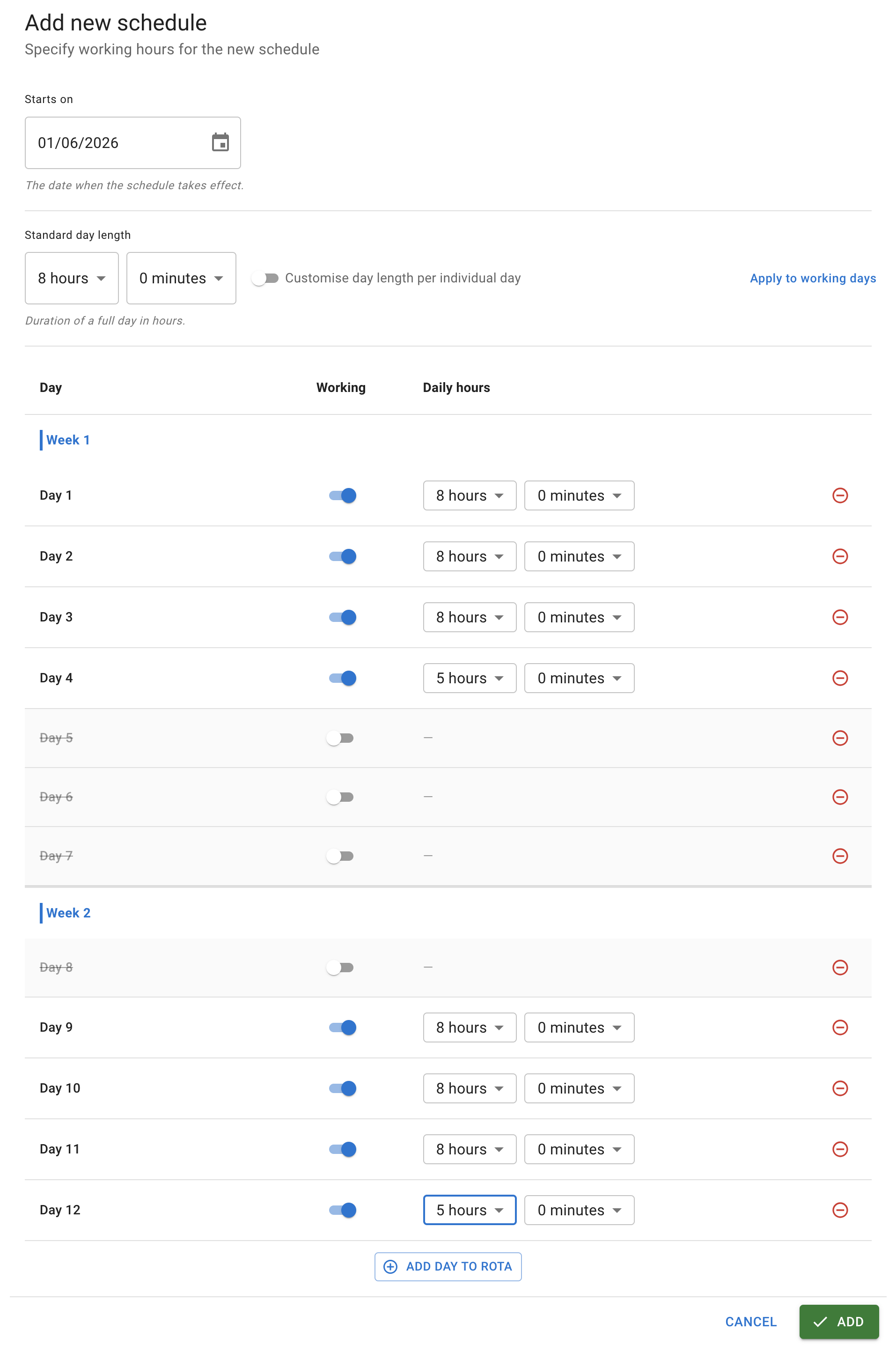
Rota start date
The rota start date is important.
It tells TimeOff.Management where the repeating pattern begins.
If the start date is wrong, the rota may be shifted by one or more days.
This can cause leave to be deducted from the wrong days.
Always check the rota calendar after saving the pattern.
Standard day length and partial bookings
TimeOff.Management uses the standard day length to decide whether a booking is a full day or a partial day.
The number of hours alone does not decide this.
For example, 5 hours can be either a full day or a partial day. It depends on the standard day length set for that employee, company, or working day.
| Standard day length | Employee books | How TimeOff treats it |
|---|---|---|
| 8 hours | 5 hours | Partial day |
| 7.5 hours | 5 hours | Partial day |
| 5 hours | 5 hours | Full day |
| 5.5 hours | 5.5 hours | Full day |
This is useful when employees work shorter days on some days of the week.
For example, an employee may normally work:
| Day | Standard day length |
|---|---|
| Monday | 8 hours |
| Tuesday | 8 hours |
| Wednesday | 8 hours |
| Thursday | 8 hours |
| Friday | 5 hours |
If this employee books 5 hours on Friday, TimeOff.Management treats it as a full Friday, because Friday’s standard day length is 5 hours.
If the same employee books 5 hours on Monday, TimeOff.Management treats it as a partial Monday, because Monday’s standard day length is 8 hours.
This helps companies manage employees who have shorter Fridays, different weekend shifts, compressed hours, or mixed working patterns.
The key rule is:
Full day = booked hours match the standard day length for that day.
Partial day = booked hours are less than the standard day length for that day.
Rotas and allowance issues
If leave is not deducted as expected, check the rota first.
Common causes include:
- the rota start date is wrong
- the rota pattern was entered incorrectly
- the employee changed working pattern but the rota was not updated
- leave was booked on a rota day off
- the wrong employee schedule or rota is active
Read more: Why isn’t leave being deducted from the allowance?
Related articles
-
Setting employee schedule Use schedules when employees work the same days each week.
-
Setting up allowances Learn how schedules, rotas, department allowance, individual allowance, and leave types work together.
-
Why isn’t leave being deducted from the allowance? Check common reasons why a leave request did not reduce an employee allowance.
Best practice
Set the rota before the employee starts booking leave.
After saving, check the employee calendar to make sure the working days and days off look correct.