
Rolling window leave types
A rolling leave type is a leave type with a limit that is checked over a moving period of time.
This is a specialist setting. Counting per leave year is the right answer for almost every leave type, and it is what a leave type you create starts on (Does not use the allowance, counted per leave year) — reach for a rolling window only when an entitlement is genuinely defined by a trailing period rather than by your company leave year. If you are setting up holiday, sick leave or working from home, start at Leave types instead.
It is different from a normal yearly leave allowance.
With a normal yearly allowance, the balance usually resets at the start of a new leave year.
With a rolling leave type, the system checks how much leave the employee has already used in a selected period before allowing more leave.
In TimeOff.Management, a rolling leave type is designed for a simple rule:
X days in any selected number of consecutive monthsFor example:
5 days in any 12 consecutive monthsThis means the employee can take up to 5 days of that leave type, but the system checks the previous 12 consecutive months before the request is approved.
This is useful for simple rolling leave policies that are hard to manage in Excel.
This article explains how rolling leave types work in TimeOff.Management. It is general guidance, not legal advice. Always check the law or company policy that applies to your business.
What TimeOff.Management rolling leave can do
TimeOff.Management supports a practical rolling leave rule.
You can set:
Leave limit: number of days
Rolling period: number of consecutive months
For example:
3 days in 12 consecutive months
10 days in 6 consecutive months
20 days in 24 consecutive months
When an employee requests that leave type, TimeOff.Management checks the selected rolling window and helps prevent the leave from going over the day limit you have set.
This is helpful when the policy should not simply reset on 1 January or at the start of the company leave year.
What TimeOff.Management rolling leave does not do
TimeOff.Management is a simple leave management system.
It is not a payroll system. It is not a legal compliance calculator.
A rolling leave type in TimeOff.Management does not:
- set limits in weeks or months
- calculate complex legal entitlement automatically
- calculate FMLA entitlement in workweeks or hours
- use special payroll-style start dates
- start a period from rules such as “the Sunday before the leave begins”
- automatically link several leave types under one shared cap
- automatically prorate complex legal leave limits from an employee schedule
- decide whether an employee is legally eligible
- replace HR, payroll or legal review
This is important.
TimeOff.Management gives you a clear way to manage simple rolling leave limits.
It does not try to replace a specialist payroll or compliance platform.
The simple rule to remember
Use a rolling leave type when your policy can be written like this:
An employee can take up to [number] days of [leave type] in any [number] consecutive months.Examples:
3 days in any 12 consecutive months
5 days in any 36 consecutive months
10 days in any 6 consecutive months
20 days in any 24 consecutive months
If your rule can be written this way, it is usually a good fit for a TimeOff.Management rolling leave type.
If your rule needs weeks, hours, claim years, payroll dates, linked absences, multiple shared caps or legal eligibility checks, you may still be able to use TimeOff.Management to manage the leave.
But HR, payroll or the business owner should review the details before approval.
Rolling leave vs yearly leave
Here is the simple difference.
| Leave setup | How it works | Example |
|---|---|---|
| Yearly leave | The employee gets a set limit for a fixed leave year | 10 sick days from 1 January to 31 December |
| Rolling leave | The system checks leave used in a moving month window | 5 days in any 12 consecutive months |
| Fixed period leave | The employee gets a limit in a fixed company period | 3 personal days in the company leave year |
| Managed leave | The leave needs review before approval | Medical, family, emergency or protected leave |
Rolling leave is useful when the limit should move with the request date.
It is often used for leave that needs closer control.
How a rolling leave window works
Imagine your company has this policy:
An employee can take up to 5 days of emergency family leave in any 12 consecutive months.An employee requests 2 days of emergency family leave from 10 July 2026.
Before approving the request, TimeOff.Management checks how much of this leave type the employee has already used in the relevant 12-month window.
If the employee has already used 4 days in that window, they only have 1 day left.
If they have already used 2 days in that window, they have 3 days left.
The important point is this:
The window moves every time a new request is made.
If the employee requests more leave on 20 August 2026, the month window is checked again from that new request date.
That is why rolling leave is harder to manage than a normal annual allowance.
Why rolling leave is hard to track in Excel
Rolling leave looks simple at first.
But it becomes difficult when there are many employees, old records, partial absences and different policies.
Common spreadsheet problems include:
- the wrong date range is used
- old leave is counted when it should have dropped out
- old leave is missed because it sits on another sheet
- part-days are added incorrectly
- one employee has a different limit from another employee
- managers approve leave without checking the full history
- sensitive leave reasons are visible to the wrong people
This is why rolling leave should be treated as a managed leave type.
It needs clear records, approval control and regular review.
Good examples for TimeOff.Management rolling leave
The best fit is a policy based on days and consecutive months.
Here are a few simple examples.
Example 1: Emergency family leave
A company policy might say:
Employees can take up to 5 days of emergency family leave in any 12 consecutive months.This is a strong fit for a rolling leave type.
Suggested setup idea:
Leave type: Emergency Family Leave
Limit: 5 days
Rolling period: 12 months
Approval: Manager or HR
Visibility: Private or limited
This is simple, clear and easy to manage.
Example 2: Company compassionate leave
A company policy might say:
Employees can take up to 10 days of compassionate leave in any 24 consecutive months.This is also a good fit.
Suggested setup idea:
Leave type: Compassionate Leave
Limit: 10 days
Rolling period: 24 months
Approval: Manager + HR
Visibility: Private or limited
This helps the business support employees while still keeping a clear record of leave used.
Example 3: Company sickness rule
A company may want a simple sickness control rule such as:
Employees can take up to 10 paid sick days in any 6 consecutive months.Suggested setup idea:
Leave type: Paid Sick Leave
Limit: 10 days
Rolling period: 6 months
Approval: Manager
Visibility: Normal or private
This is not the same as a statutory sick pay calculator.
It is a practical leave management rule.
Real-world examples from the USA and Europe
Some legal leave policies use rolling periods, consecutive months, claim years or linked periods.
Not all of them fit perfectly into TimeOff.Management.
That is expected.
TimeOff.Management is built for simple leave management, not complex payroll compliance.
The examples below show where rolling leave can be a good fit, a close fit, or something that needs manual review.
USA example: FMLA rolling 12-month period
In the United States, the Family and Medical Leave Act, or FMLA, allows employers to choose from several ways to define the 12-month leave year.
One option is a rolling 12-month period measured backward from the date an employee uses FMLA leave.
Official source: US Department of Labor FMLA 12-month period fact sheet
This is a useful example because it shows why rolling windows matter.
But FMLA is more complex than a simple TimeOff.Management rolling leave type.
FMLA may involve:
- workweeks
- hours
- eligibility rules
- job protection
- intermittent leave
- medical certification
- state rules
- HR review
TimeOff.Management does not automatically calculate FMLA compliance.
For a simple internal tracking model, a business may choose to create a managed leave type such as:
Leave type: FMLA - Managed Leave
Limit: 60 days
Rolling period: 12 months
Approval: Manager + HR
Visibility: Private
This can be a close practical fit for a standard 5-day working pattern where 12 workweeks are treated as 60 working days.
But this should be checked by HR, payroll or the business owner.
If the business needs exact FMLA calculation in hours or workweeks, TimeOff.Management should not be used as the only compliance calculator.
Europe example: Ireland force majeure leave
Ireland has a strong example of a consecutive-month leave rule.
Force majeure leave is used for urgent family reasons where a close family member is injured or ill and needs the employee’s immediate attention.
HSE guidance says force majeure leave must not exceed:
3 working days in any 12 consecutive months
5 working days in any 36 consecutive months
Official source: HSE force majeure leave guidance
This is a strong fit for a rolling leave type because the rule is based on days and consecutive months.
Suggested setup idea for the main rule:
Leave type: Force Majeure Leave
Limit: 3 days
Rolling period: 12 months
Approval: Manager + HR
Visibility: Private or limited
There is also a longer 36-month limit.
If your TimeOff setup only uses one rolling limit for the leave type, you can use the 12-month rule in the leave type and review the 36-month rule through reports before approval.
Another option is to create a separate internal check process for the 36-month limit.
Europe example: France parental presence leave
France has a long leave reserve for parental presence leave.
Service Public explains that an employee may have a reserve of up to 310 working days that can be used as needed for up to 3 years when caring for a child with a serious illness, disability or accident.
Official source: Service Public parental presence leave update
This is not a perfect TimeOff.Management rolling leave example.
It is a long managed leave bank.
A simple TimeOff.Management approximation could be:
Leave type: Parental Presence Leave
Limit: 310 days
Rolling period: 36 months
Approval: HR review
Visibility: Private
This may help with basic tracking.
But HR should still review the full legal rule, case details and any renewal requirements.
Use this as a managed leave record, not as a full compliance calculator.
Europe example: UK linked sickness periods
UK Statutory Sick Pay has linked sickness period rules.
GOV.UK says regular periods of sickness may count as linked if they last more than one full working day and are 8 weeks or less apart.
Official source: GOV.UK Statutory Sick Pay eligibility
This is not a normal rolling leave type.
It is a linked absence rule.
TimeOff.Management rolling leave is not designed to automatically link separate sickness periods for statutory pay calculations.
However, TimeOff.Management can still help by keeping sickness records in one place.
Managers or payroll can then review absence history before making pay decisions.
Suggested approach:
Leave type: Sickness
Use reports to review: linked sickness periods
Approval: Manager or HR
Payroll decision: handled outside TimeOff.Management
This is a good example of where TimeOff.Management helps with absence records, but does not replace payroll compliance.
When to use a rolling leave type
Use a rolling leave type when the policy is based on:
A day limit
+
A selected number of consecutive months
Good signs that the policy may fit include phrases such as:
in any 6 consecutive months
in any 12 consecutive months
in any 24 consecutive months
in any 36 consecutive months
in a rolling 12-month period
Rolling leave types are useful when:
- the leave should not reset on the company leave year
- the employee can take the leave in smaller blocks
- the entitlement depends on recent previous usage
- old leave should drop out of the calculation over time
- the leave needs closer approval control
- the rule is simple enough to express in days and months
When not to use a rolling leave type
Do not use a rolling leave type if the policy is a simple yearly allowance.
For example:
10 sick days per calendar year
25 holiday days per company leave year
3 personal days from 1 January to 31 December
These are usually fixed-year leave types, not rolling leave types.
You should also be careful if the policy needs:
- limits in weeks
- limits in months
- limits in hours
- complex payroll dates
- claim years
- special start dates
- eligibility calculations
- combined caps across more than one leave type
- automatic proration based on employee schedule
- case-based rules by child, parent, family member or event
In those cases, TimeOff.Management may still help you record and manage the leave.
But the final check should be handled by HR, payroll or the business owner.
A note about combined leave limits
Some policies have one combined limit across more than one leave reason.
For example:
12 weeks of Paid Family and Medical Leave in totalTimeOff.Management does not automatically link two different leave types under one shared combined cap.
If the combined cap is the most important rule, it is usually better to create one combined leave type.
For example:
Paid Family and Medical LeaveThen use comments or notes to record the reason.
Examples:
Reason: Medical recovery
Reason: Family care
Reason: Bonding
Reason: Pregnancy-related medical leave
If you use separate leave types, such as Paid Medical Leave and Paid Family Leave, make sure HR or the business owner reviews the combined total before approval.
A note about different employee limits
Some employees may need different limits.
For example, a full-time employee and a part-time employee may not have the same internal leave allowance.
TimeOff.Management does not automatically calculate complex legal leave limits from the employee’s schedule.
Instead, admins can set different limits for different users.
That means the correct limit should be checked first by HR, the owner or another authorised person.
Then the admin can enter the correct limit for that employee.
This is better than using one spreadsheet formula for everyone.
Suggested wording for employees
You can use simple wording like this in your company policy:
This leave type has a rolling limit.

Before we approve your request, we will check how much of this leave you have already used in the selected consecutive-month period.

Your available balance may change as older leave drops out of the rolling window.
For sensitive leave, you can also add:
This leave type may need manager or HR approval.

The reason for your leave will only be visible to people who need it for approval, reporting or administration.
Summary
A rolling leave type is useful when a leave limit should be checked over a moving month window.
In TimeOff.Management, rolling leave works best for simple rules such as:
X days in any Y consecutive monthsIt is a good fit for company policies such as emergency family leave, compassionate leave, managed sickness rules and other simple rolling day limits.
It can also be used as a close tracking aid for more complex leave policies.
But TimeOff.Management is not a payroll or compliance system.
It does not automatically calculate every legal entitlement, link multiple leave types under one shared cap, or use complex payroll-style periods.
For complex leave, use TimeOff.Management to keep the process clear, then let HR, payroll or the business owner make the final policy check.
How to set up a rolling leave type in TimeOff.Management
You can set up a rolling leave type from the Leave type form.
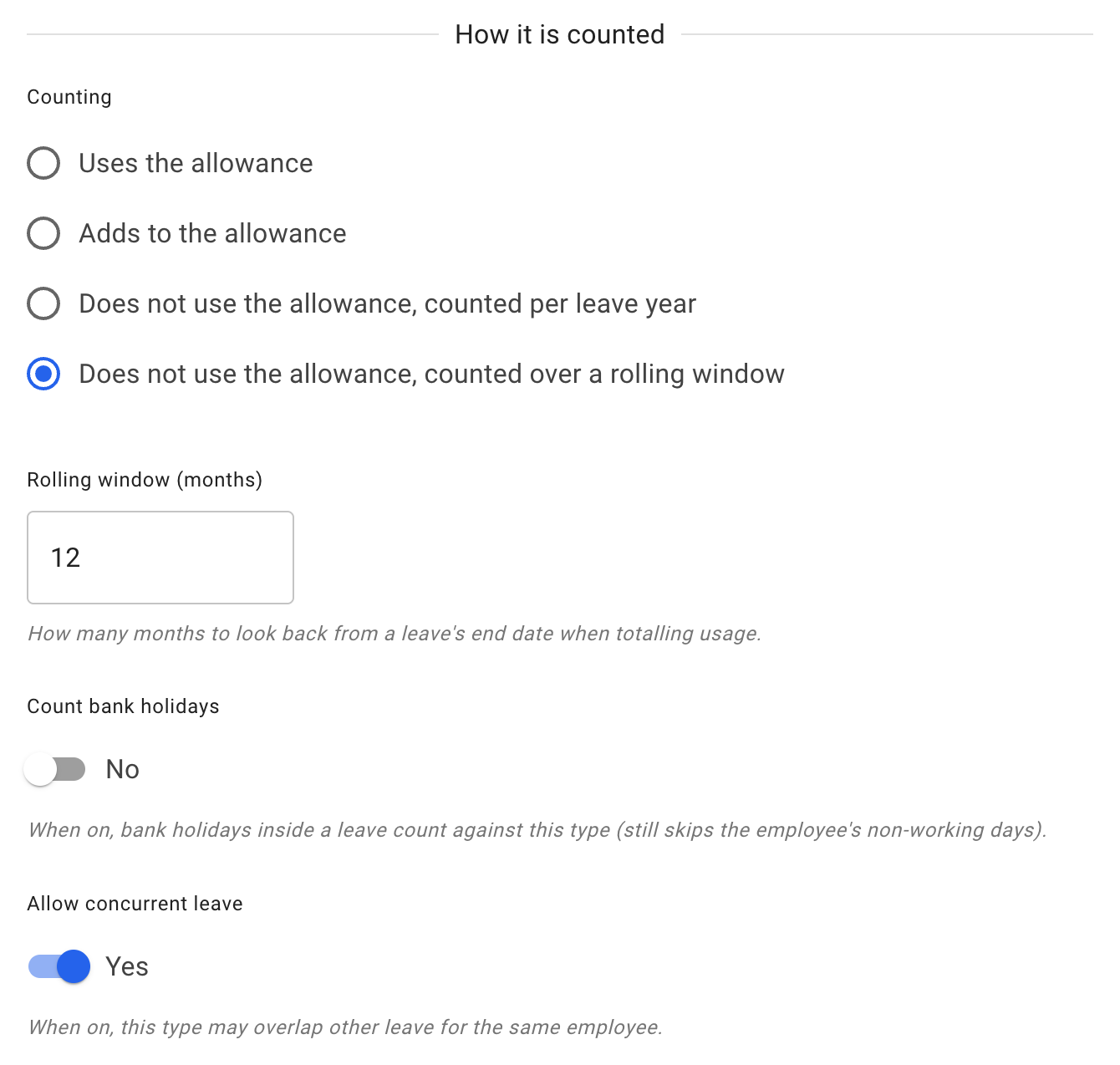
A rolling leave type is set in the How it is counted section. Choose Does not use the allowance, counted over a rolling window as its Counting, then set how many months the window covers in Rolling window (months).
What changes when you choose a rolling window
Three things behave differently from a leave type counted per leave year.
The limit becomes required. On a leave type counted per leave year the limit is optional and can be left blank for no limit. A rolling window only means something measured against a limit, so a rolling leave type must have one.
It never uses or adds to the allowance. A leave type counted per leave year can use the allowance, add to it, or neither. A rolling one is always governed by its own limit over the window rather than by the employee’s allowance, which is why its Counting option says it does not use the allowance.
The employee can see where they stand. When someone books a rolling leave type, they are shown how much of the limit they have left for that window. It is not a constraint they discover only when the request is refused.
Two settings that only appear on rolling leave types
Both of these appear once Counting is set to Does not use the allowance, counted over a rolling window. They are not general leave type settings, and you will not find them on a leave type counted per leave year.
-
Count bank holidays Whether bank holidays that fall inside a booking of this leave type count as used. Normally a bank holiday in the middle of a booking is not a day of leave. This setting exists for statutory leave that runs continuously regardless of what day it is.
The form is explicit that switching it on still skips the employee’s own non-working days — it is about bank holidays specifically, not about working patterns.
-
Allow concurrent leave Whether leave of this type may overlap other leave the same employee already has. Normally an employee cannot be on two kinds of leave at once and the product blocks it. Some statutory absences genuinely do run alongside other leave, and this is how you express that.
Most companies never need either. They are here for entitlements defined by statute rather than by your own policy.
Read more: Leave types