
Deactivating users
Deactivation stops an employee from accessing TimeOff.Management from the end of employment date without deleting their data.
Use it when an employee:
- leaves the company
- finishes a temporary contract
- no longer needs system access
- should remain in historic leave records and reports
The employee remains in TimeOff.Management, but their account becomes inactive after the selected end-of-employment date.
Deactivate or delete?
Deactivation and deletion are different.
| Action | What happens |
|---|---|
| Deactivate employee | Stops access but keeps the employee’s data |
| Delete employee | Permanently removes the employee where deletion is allowed |
Deactivation is usually the safer option when you still need the employee’s leave history for reports, payroll checks, or company records.
Read more: Adding, editing, and deleting users
Before deactivating an employee
Before setting the employee’s end date, check:
- their final working date
- pending leave requests
- approved future leave
- unused allowance or PTO
- allowance adjustments
- reports you may need
- whether they are a manager or approver
- whether another person should take over their responsibilities
If the employee approves leave for other people, assign a new approver before deactivating their account.
How to deactivate an employee
To deactivate an employee:
- Go to Employees.
- Select the employee.
- Open Employee Details.
- Go to General details.
- Click Edit.
- Find the End of employment field.
- Enter the employee’s final date.
- Click Save changes.
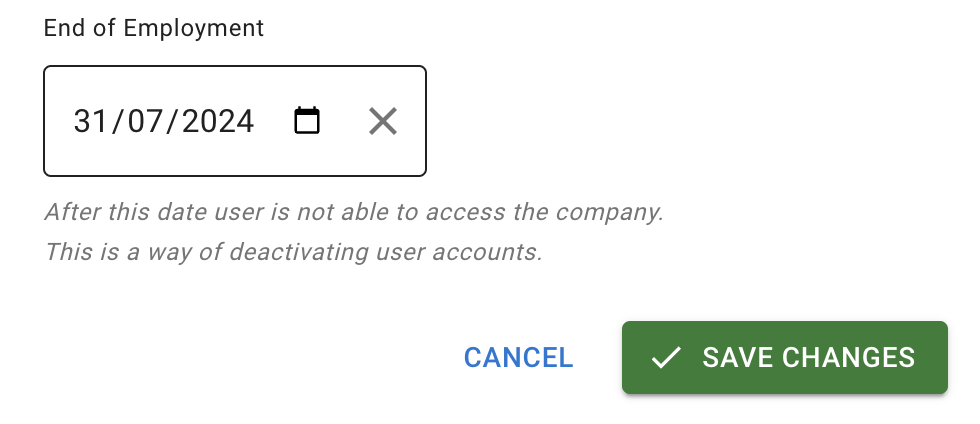
The employee can access TimeOff.Management only until the specified date.
Setting the date also pro-rates the employee’s allowance for the leave year they leave in, unless an admin has set the End of employment figure on their Allowance tab by hand. Employees whose allowance comes from an accrued allowance schedule follow the schedule.
Read more: Allowance for employees who join or leave during the year
What happens after deactivation?
After the end-of-employment date takes effect:
- the employee can no longer access TimeOff.Management
- their status is shown as Inactive
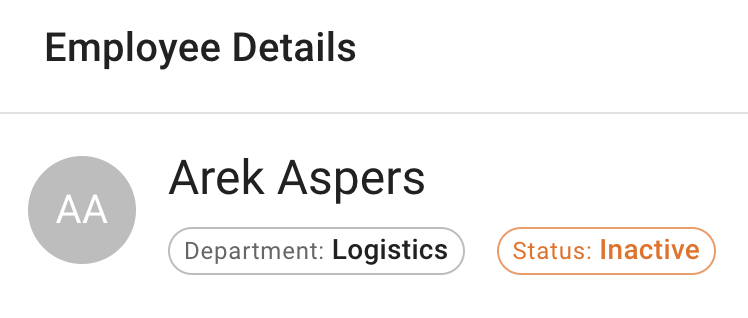
- their existing data remains in the system
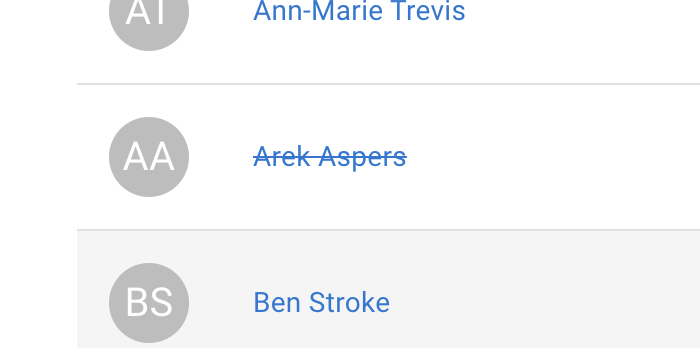
- their name appears crossed out in the Employees list
- their name appears crossed out in Team View
What happens to the employee’s leave data?
Deactivation does not delete the employee’s existing data.
You can still keep records such as:
- past leave requests
- approved absences
- leave type history
- allowance adjustments
- comments
- files attached to their leave requests
- documents on their employee record
- approval records
- employee reports
This is useful when you need to keep a clear employment and absence history.
Read more:
Check future leave requests
Before deactivating the employee, review any leave booked after their final working date.
You may need to:
- cancel future leave
- revoke approved requests
- correct the employee’s final allowance
- add an explanatory comment
- update payroll or internal records
Read more: Cancel or revoke leave requests
Check allowance and PTO
Review the employee’s allowance before their account becomes inactive.
Check:
- remaining allowance
- leave already used
- future bookings
- carry over
- manual adjustments
- TOIL
- individual allowance
The correct action depends on your company policy and the employee’s final working date.
Read more: Setting up allowances
If the employee is a manager or approver
Before deactivating a manager or approver, check whether other employees depend on them for leave approval.
Assign another approver where needed.
This helps prevent new leave requests from being left without the right person to review them.
Read more: How to assign and manage leave approvers
Important billing note
Deactivated employees are still billed at the normal rate.
Deactivation changes the employee’s access status. It does not remove them from billing.
Keep this in mind when managing employees who have left the company.
Back up employee leave data
You may want to download or back up employee leave information before or after deactivation.
This can help with:
- payroll records
- HR records
- absence history
- year-end checks
- internal audits
Read more: How to back up employees’ leave data
Related articles
-
Adding, editing, and deleting users Add employees, update employee records, and choose whether to deactivate or delete a user.
-
How to back up employees’ leave data Export employee leave information for company records and reporting.
-
How to assign and manage leave approvers Assign a new approver before deactivating a manager who reviews employee leave.
Best practice
Set the employee’s end-of-employment date as soon as their final working date is confirmed.
Review future leave, allowance, and approval responsibilities before the account becomes inactive.