
Manage weekly Who is Off emails
The weekly Who is Off email helps you keep track of upcoming employee absences.
These emails are enabled by default.
Each user can choose whether they want to receive them.
Disable weekly Who is Off emails
To stop receiving the weekly email:
- Open My Profile.
- Select Communications.
- Find the weekly Who is Off email setting.
- Change the setting to Disabled.
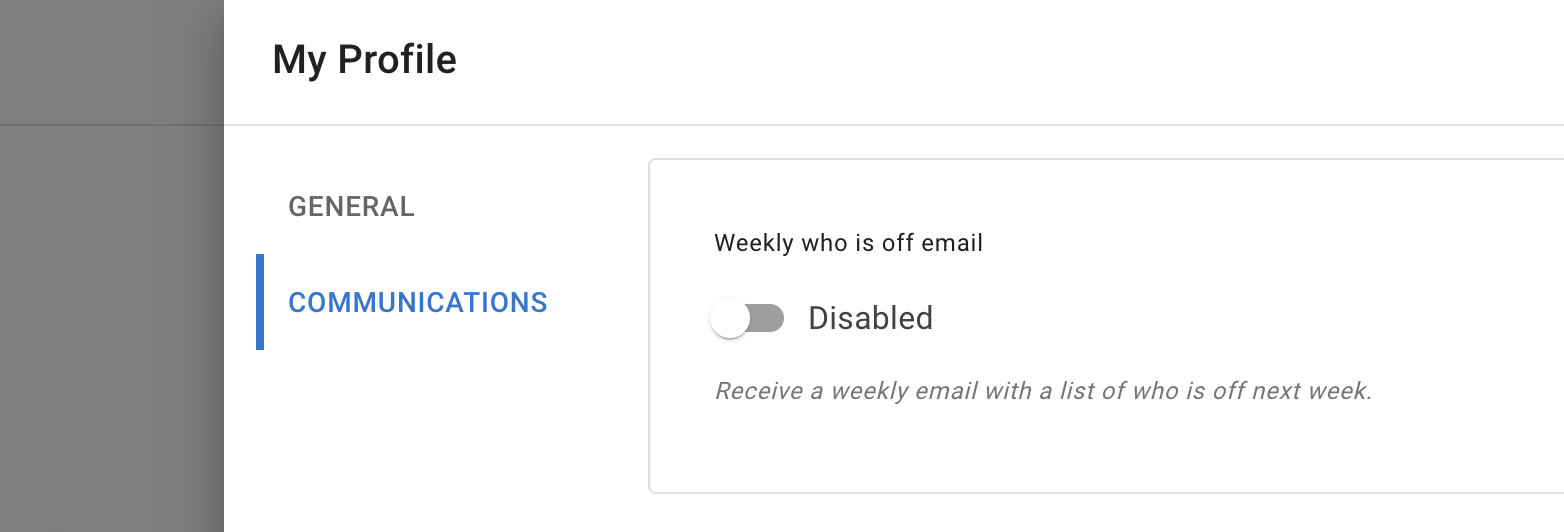
The change is applied immediately.
Re-enable the weekly email
You can turn the email back on at any time.
To re-enable it:
- Open My Profile.
- Select Communications.
- Find the weekly Who is Off email setting.
- Change the setting to Enabled.
Who controls this setting?
This is a personal communication setting.
Each employee, manager, or administrator can choose whether they want to receive the weekly email.
Changing your setting does not change the preferences of other users.
Other weekly updates
Depending on your company setup, the Communications section may also include weekly updates for:
- employee birthdays
- work anniversaries
- other company notifications
Review each option and enable only the updates you want to receive.
Does disabling the email remove leave information?
No.
Disabling the weekly email does not remove employee leave from TimeOff.Management.
You can still check upcoming absences in:
- Team View
- My Calendar
- Heat Map, if you are an administrator
- Reports, if you have access
Read more: Using Team View
If emails continue after disabling the setting
Check:
- that the setting was saved
- that you changed the setting in the correct account
- whether the email is a weekly digest or a different notification
- whether you have more than one TimeOff.Management account
- whether another communication option is still enabled
Leave request approval emails and other account notifications may be controlled separately.
Related articles
-
Using Team View Check upcoming employee absences without relying on weekly email updates.
-
My Calendar Review your own leave requests, allowance, public holidays, and company events.
-
Using TimeOff on mobile Check calendars, Team View, and leave requests from a mobile browser.
Best practice
Keep the weekly email enabled when it helps you plan team cover.
Disable it when you already check Team View regularly and no longer need the extra reminder.