
End-of-Year Guide: How to Manage Vacation Carry Over Efficiently
Carry over helps you manage unused leave allowance at the end of the company year.
Some companies call this:
- carry over
- holiday carry over
- vacation carry over
- unused allowance
- unused PTO
- annual leave carry over
In TimeOff.Management, Carry Over helps admins move unused allowance from the current year into the next year.
This gives your company a clear record of what was moved, why it was moved, and how it affects the employee’s allowance balance.
What Carry Over does
Carry Over helps you:
- apply a company-wide carry over rule
- review unused allowance by employee
- override carry over for selected employees
- move approved unused allowance into the next year
- keep a clear record of allowance adjustments
- show carried-over days in the next year’s allowance breakdown
For example, your company may allow employees to carry over up to 3 unused days into the next year.
You can apply this rule across the company, then adjust individual employees where needed.
How carry over fits with allowance setup
Carry over is part of year-end allowance management.
It works with your wider allowance setup, including:
- department allowance
- individual allowance
- accrual schedules
- manual allowance adjustments
- leave type limits
- the Leave usage alert report
- year-end PTO checks
For a full overview of how allowance works, read: Setting up allowances
Before you carry over unused allowance
Before running carry over, check that the current year is up to date.
Make sure:
- all leave requests for the current year have been added
- pending requests have been reviewed
- cancelled or revoked requests are correct
- manual allowance adjustments have been added where needed
- employee schedules are correct
- employee allowance balances look right
This helps avoid mistakes when unused allowance is moved into the next year.
Open the Carry Over page
The Carry-over allowance page is a tile on the Settings page.

Company-wide carry over policy
If your company has a standard carry over rule, configure it in settings.
For example, your company may allow employees to carry over up to 3 unused days.
This creates a clear rule for everyone.
You can still review each employee before applying carry over.
This is useful because not every case is the same.
For example:
- one employee may have a special agreement
- one employee may have already used extra leave
- one employee may need a manual override
- one employee may not be allowed to carry over unused allowance
Employee-level carry over
Carry over often needs case-by-case control.
To carry over allowance for employees:
- Select the years you want to carry allowance between.
- Select the department.
- Review each employee’s available carry over.
- Check the company policy.
- Override Days to Carry Over if needed.
- Click Carry Over.

Use employee-level overrides when needed
Employee-level overrides are useful when the company-wide rule does not fit a specific employee.
For example:
- an employee has an agreed exception
- an employee has a different contract
- a manager has approved extra carry over
- allowance needs to be reduced before moving into the next year
- HR needs to apply a special case
Use the override field to set the correct number of days to carry over.
What changes after carry over
After carry over is completed, TimeOff.Management shows the result in several places.
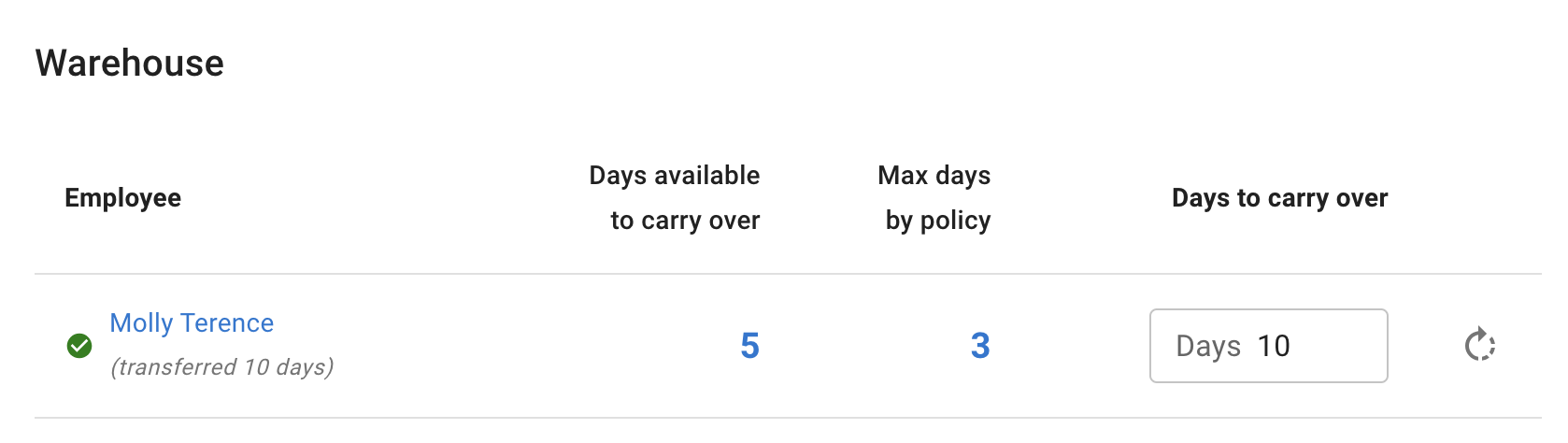
1. Carry Over page
A green tick appears on the Carry Over page.
Comments also show that days have been transferred.
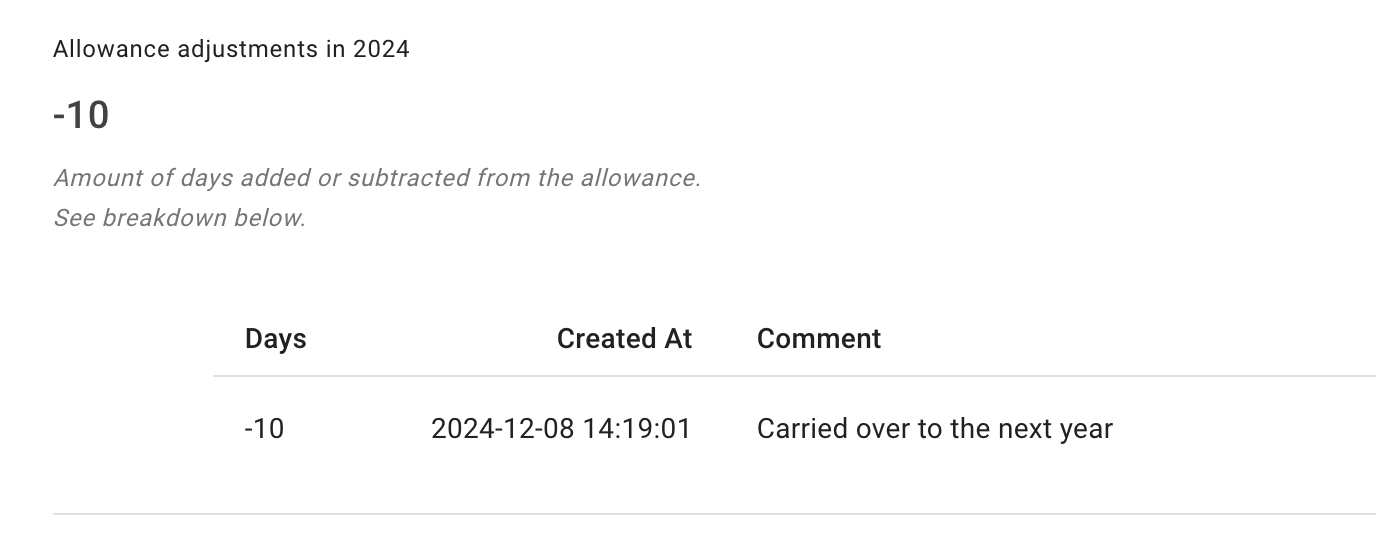
2. Current year allowance
In the current year, an allowance adjustment is added.
This shows that the unused days have been moved into the next year.
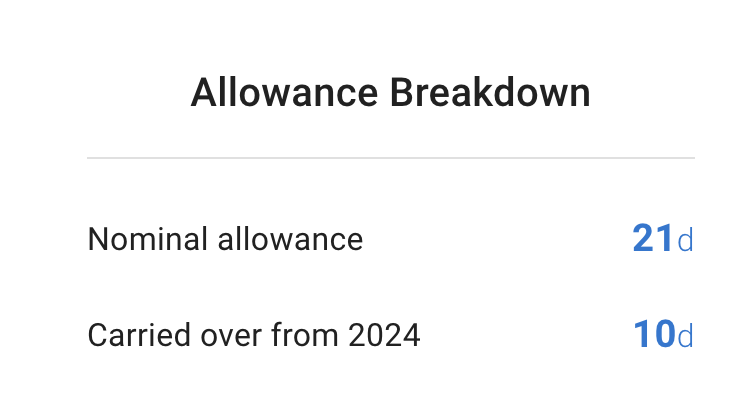
3. Next year allowance
In the next year, the allowance breakdown shows a Carried Over line.
This helps employees, managers, and admins see where the extra allowance came from.
Handling last-minute changes after carry over
Sometimes a last-minute change happens after carry over has already been completed.
For example, an employee may need to book leave in late December after all unused allowance has already been moved into the next year.
In this case, you may need to adjust both years.
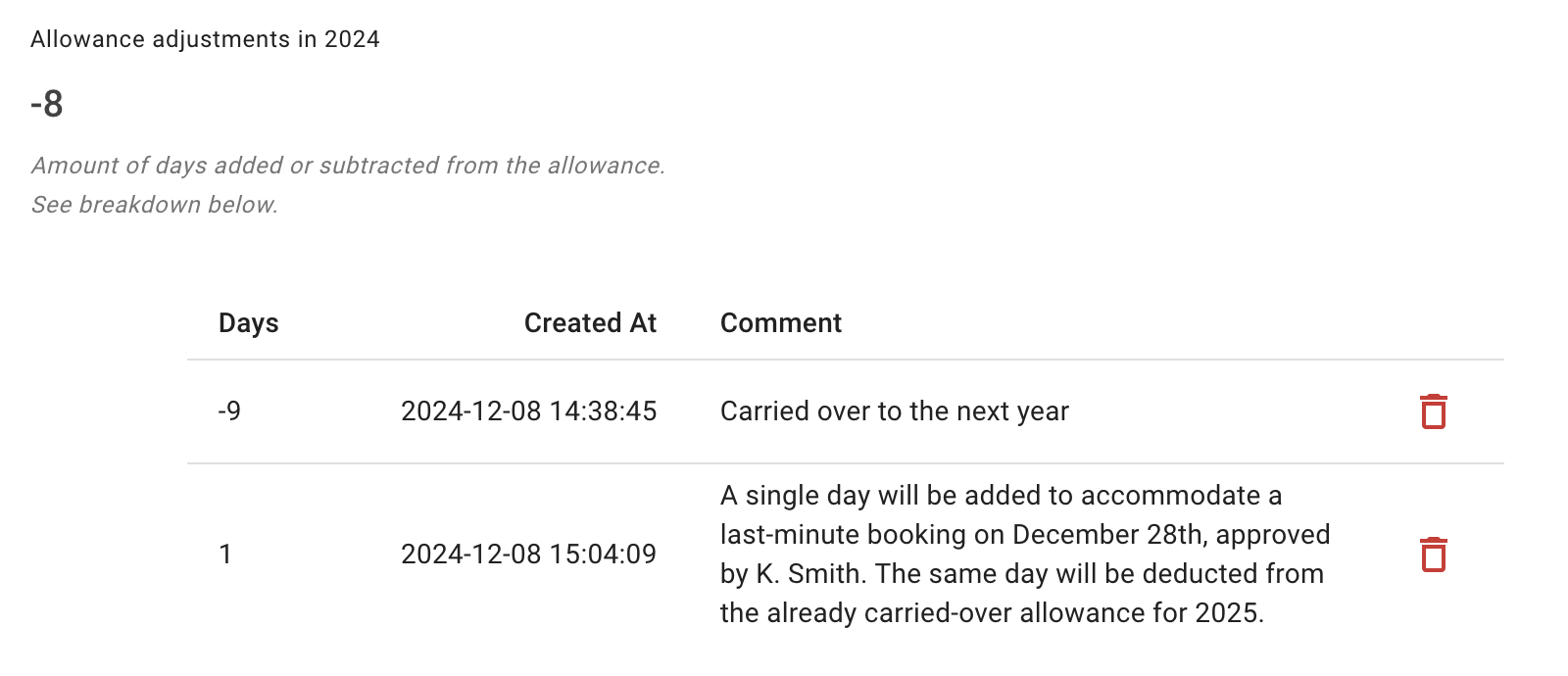
Step 1: Adjust the current year
Add an allowance adjustment in the current year so the employee can book the needed day or days.
Step 2: Adjust the next year
Add a matching negative adjustment in the next year.
This reduces the next year’s balance by the same amount.

This keeps the employee’s allowance accurate across both years.
Read more: Allowance adjustments and TOIL
Example
An employee has 3 unused days.
You carry all 3 days into the next year.
After carry over, the employee needs to book 1 more day in the current year.
To keep the balance correct:
- Add 1 day back into the current year so the employee can book the leave.
- Add a negative 1-day adjustment in the next year.
- Leave a clear comment on both adjustments.
This keeps the record transparent.
Add clear comments
When making manual changes around carry over, always add a short comment.
Good comments are simple and specific.
For example:
- “Adjusted after late December booking.”
- “Reduced next year balance after post-carry-over leave request.”
- “Manual correction after carry over review.”
- “Approved HR exception for additional carry over.”
Clear comments help managers and admins understand what happened later.
Carry over and the Leave usage alert report
Before year end, use the Leave usage alert report to spot employees who may not have booked enough leave.
This helps managers encourage employees to plan time off before the year closes.
It can also reduce the amount of unused allowance that needs to be carried over.
Read more: Leave usage alert
Carry over and year-end allowance checks
Carry over is only one part of year-end allowance management.
Before the new company year starts, also review:
- department allowance
- individual allowance
- accrual schedules
- tenure-based allowance
- manual adjustments
- leave type limits
- unused allowance
- carry over rules
Read more: End-of-Year Guide: Managing PTO/Allowance Limits for the New Year
Best practice
Run carry over only after you have checked the current year’s leave records.
Make sure all requests, cancellations, revocations, and manual adjustments are up to date.
Use employee-level overrides for special cases.
Add clear comments when making manual changes.
This keeps allowance records accurate and makes year-end leave management easier for admins, managers, and employees.