
How to request leaves
Employees can request leave from My Calendar.
You can start a request in two ways:
- select New Absence in the top-right corner
- click the date you want to book in your calendar
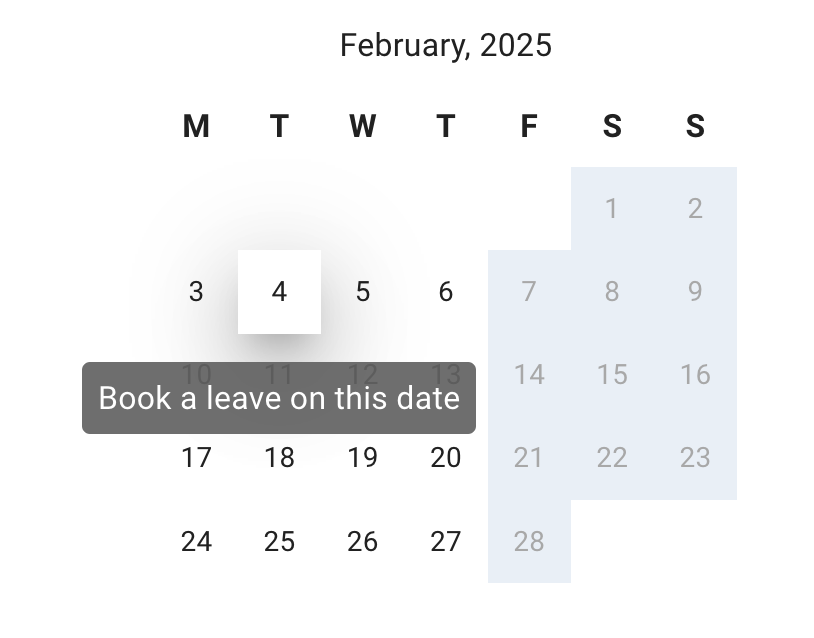
Before requesting leave
Before submitting your request, check:
- your remaining allowance or PTO
- the correct leave type
- the dates you need
- who else is off in Team View
- any blackout periods
- your company’s advance notice rules
Your company settings decide which leave types you can use and whether the request needs approval.
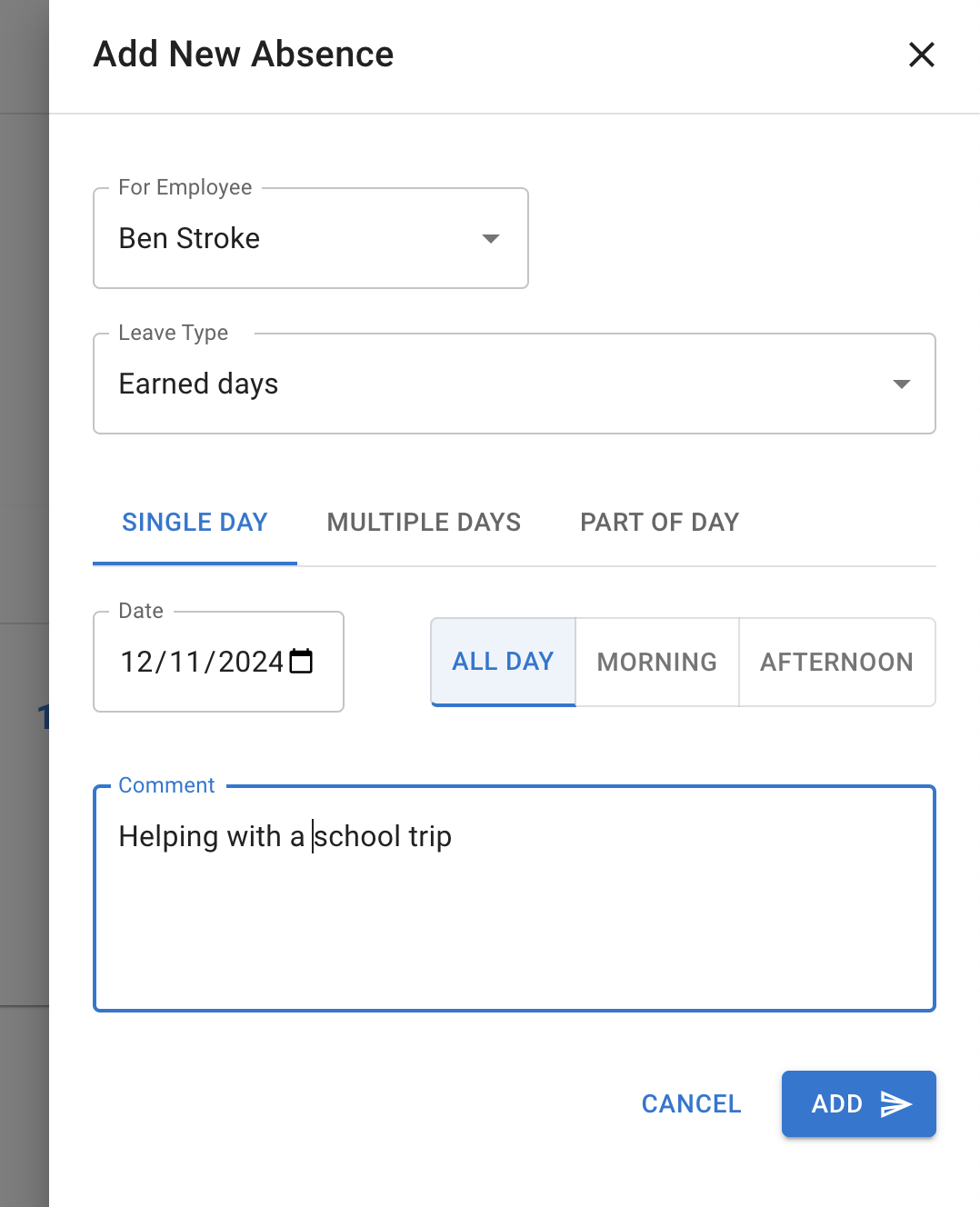
Request a single day
To request one day off:
- Open My Calendar.
- Select New Absence or click the required date.
- Choose the leave type.
- Select the date.
- Choose the full-day option.
- Add a comment if needed.
- Submit the request.
Request multiple days
You can submit one request for several consecutive days.
To request multiple days:
- Open the leave request form.
- Choose the leave type.
- Select the first and last date.
- Check the number of working days shown.
- Add a comment if needed.
- Submit the request.
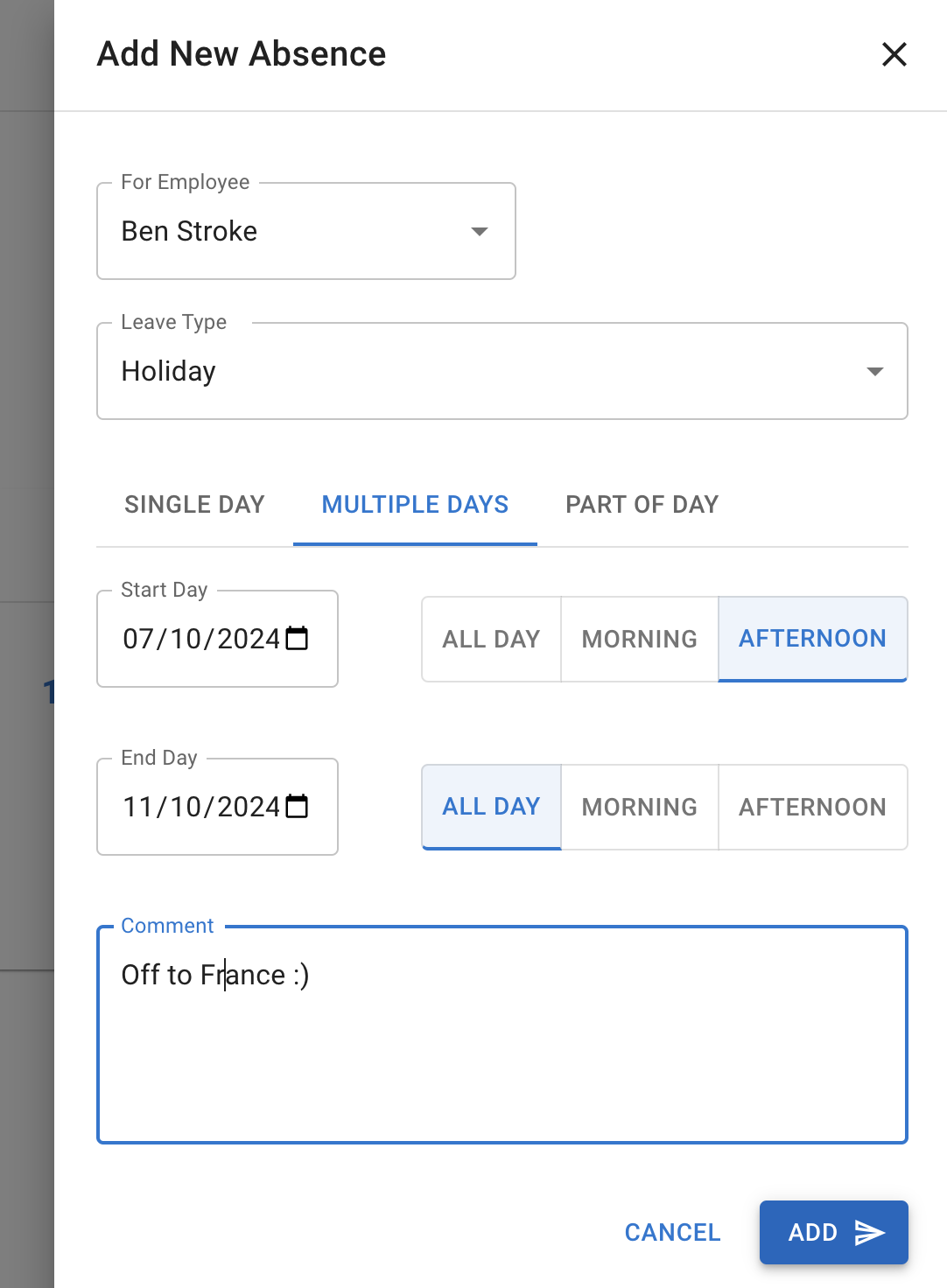
TimeOff.Management uses your work schedule or rota to identify the working days within the selected date range.
Days when you are not scheduled to work should not normally use allowance.
Request part of a day
Your company may allow partial-day leave.
Depending on the company setup, you may be able to request:
- a morning
- an afternoon
- a half day
- a selected number of hours/minutes (smallest booking increment is set up by account Administrator)
To request part of a day:
- Open the leave request form.
- Choose the leave type.
- Select the date.
- Choose the partial-day or hourly option.
- Enter the required duration.
- Add a comment if needed.
- Submit the request.
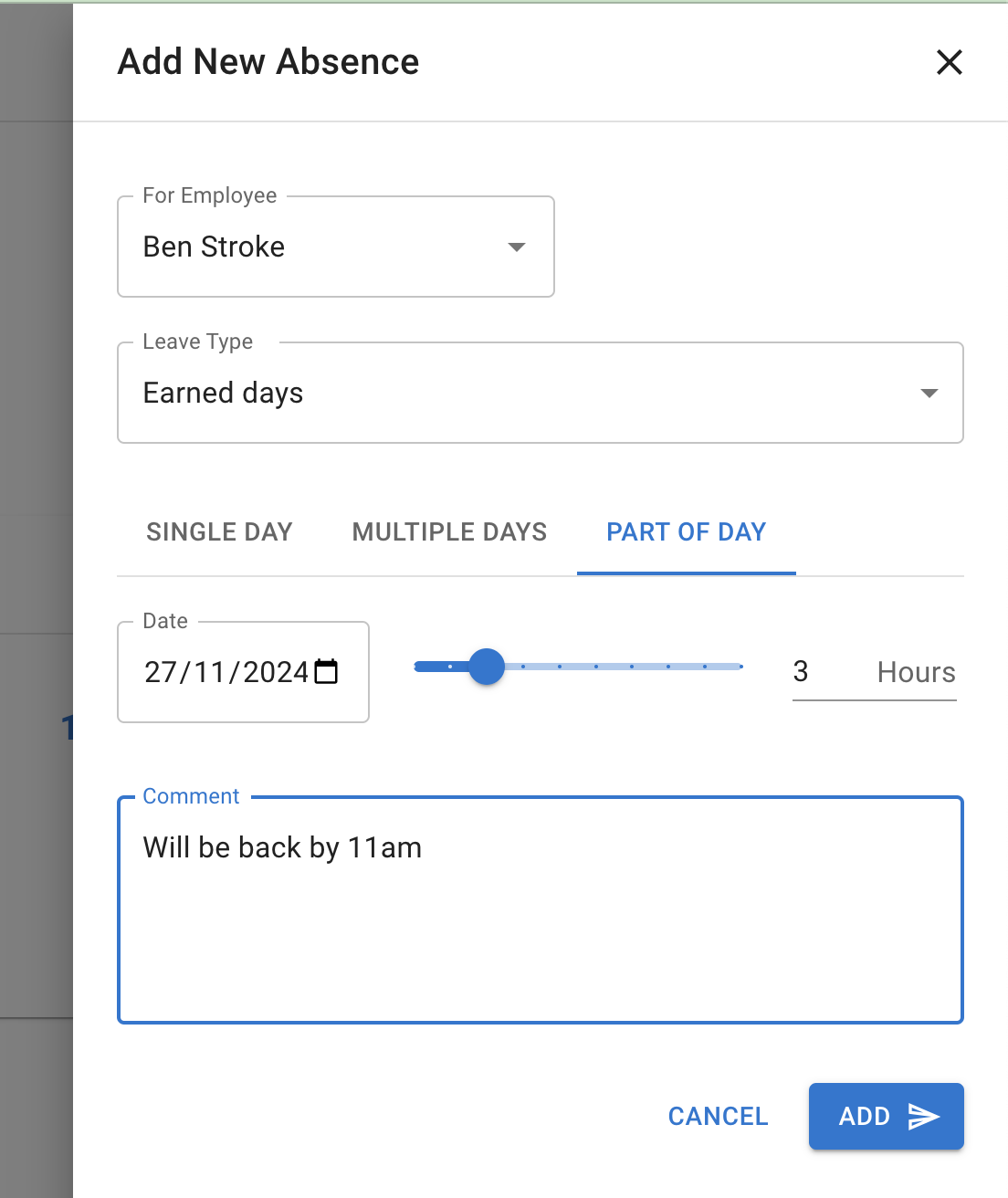
The options available depend on your company settings.
Read more: Allow partial leave
Full-day and partial-day hourly requests
TimeOff.Management uses the standard day length for that day to decide whether an hourly request is full or partial.
For example:
| Standard day length | Hours requested | Result |
|---|---|---|
| 8 hours | 8 hours | Full day |
| 8 hours | 5 hours | Partial day |
| 5 hours | 5 hours | Full day |
| 5 hours | 2.5 hours | Partial day |
This means a 5-hour request may be a full day for an employee whose normal day is 5 hours.
It would be a partial day when the normal day length is 8 hours.
Choose the correct leave type
Select the leave type that matches the reason for your request.
Examples may include:
- Holiday
- Sick Leave
- Unpaid Leave
- Working from Home
- Training
- TOIL
The leave types available depend on your company policies.
Some leave types deduct from your main allowance. Others may have their own limit or no effect on allowance.
Read more: Leave types
Add a useful comment
Your company may ask you to add a comment when requesting leave.
Keep it short and relevant.
For example:
- “Family holiday”
- “Medical appointment”
- “Using one TOIL day”
- “Morning appointment — available from 1 pm”
Do not include sensitive personal information unless your company requires it.
Attach a file
You can attach a file to your request, such as a fit note. Select the paperclip in the corner of the comment box and choose the file. You can also attach one later, from the leave’s details.
Read more: Attaching files to leave requests
What happens after you submit the request?
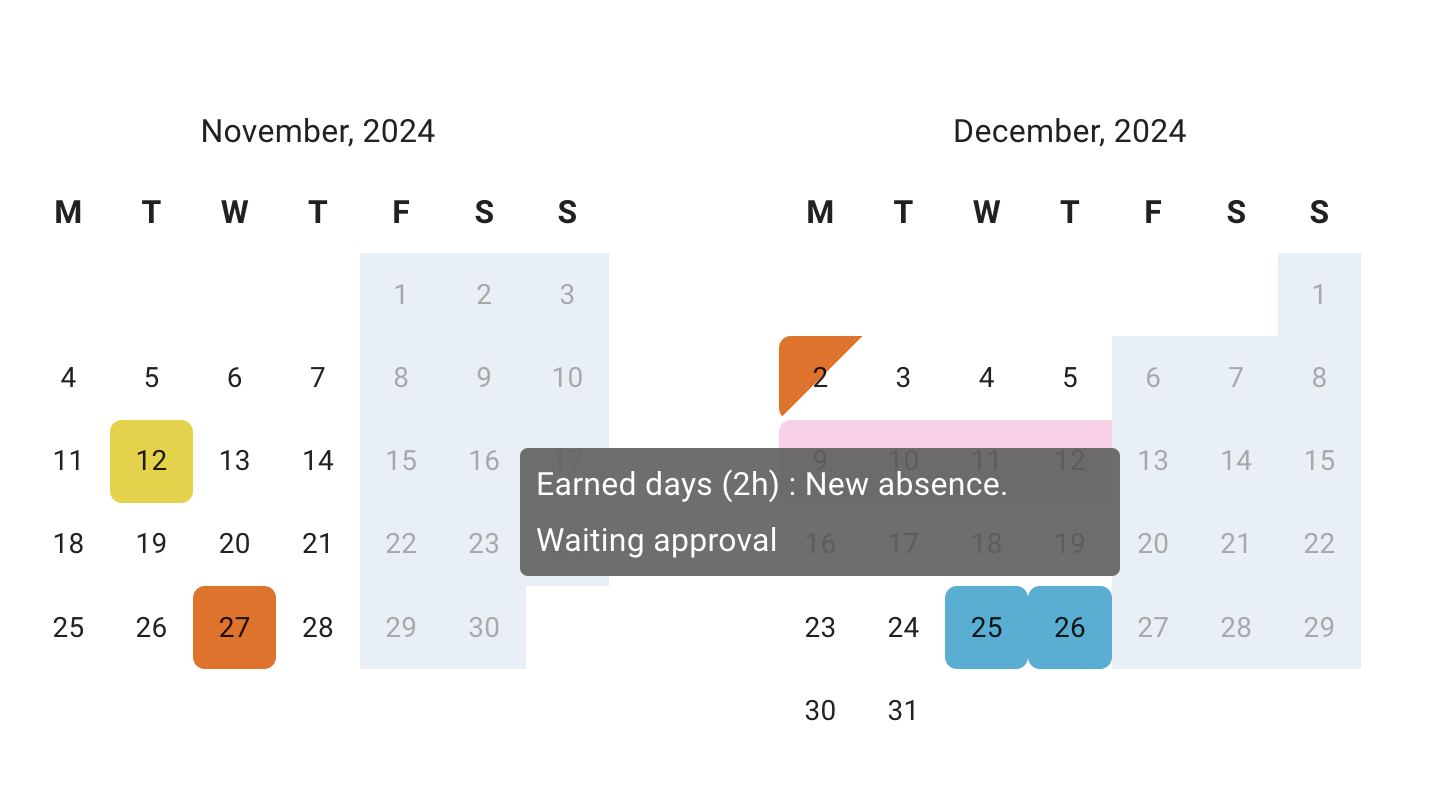
After submission, the request appears in My Calendar and Team View.
Its status will normally be:
| Status | What it means |
|---|---|
| Pending | Waiting for approval |
| Approved | The request has been accepted |
| Declined | The request was not accepted |
| Revocation pending | A request to remove approved leave is waiting for review |
Pending requests are not the same as approved leave.
Wait for confirmation before making firm travel or personal plans.
Check your request status
Open My Calendar to check whether the request is pending or approved.
You may also receive an email when your manager approves or declines the request.
Read more: My Calendar
If you cannot select a leave type
A leave type may be unavailable because:
- it is blocked for you
- it is restricted by a Leave Access policy
- it has been archived
- it is closed for employee booking
- you have reached its limit
Contact your manager or administrator if you believe you should have access.
If the request cannot be submitted
Check:
- your remaining allowance
- the selected leave type
- leave type limits
- blackout dates
- advance notice requirements
- your employee schedule
- whether negative allowance is allowed
Your administrator can review the settings if the request should be permitted.
Cancel or revoke a request
Your company may let you cancel a pending request or ask to revoke approved leave.
The available option depends on the request status and company settings.
Read more: Cancel or revoke leave requests
Request leave on mobile
You can also submit leave requests from a mobile browser.
Read more: Using TimeOff on mobile
Related articles
-
My Calendar Check allowance, leave requests, public holidays, blackouts, and company events.
-
Cancel or revoke leave requests Cancel a pending request or ask to remove previously approved leave.
-
Using Team View Check team availability before requesting time off.
Best practice
Check your allowance, Team View, blackout dates, and leave type before submitting a request.
Choose the correct dates and add a short comment when it helps your manager understand the request.